Einstellungsreferenz
Die Einstellungen von korTTY sind unter Konfiguration → Globale Einstellungen… verfügbar. Sie werden in ~/.kortty/global-settings.xml gespeichert. Diese Referenz dokumentiert jede Einstellung, geordnet nach Registerkarten.
Auf jeder Registerkartenseite werden die Einstellungen als Tabelle aufgeführt:
| Spalte | Bedeutung |
|---|---|
| Einstellung | Die im Dialogfeld angezeigte Bezeichnung |
| Typ | Umschalten · Dropdown · Nummer · Text · Farbe · Pfad |
| Werte | Zulässige Werte/Bereich |
| Standardwert | Standardwert |
| Gespeichert als | Das Feld in global-settings.xml |
Das Symbolleiste Bietet einen direkten Button für jeden Haupt-Einstellungs-Tab. Klicken Sie mit der rechten Maustaste auf die Symbolleiste, wählen Sie Icon-Leiste anpassen…, wählen Sie Einstellungen und fügen Sie die gewünschte Tastenkombination hinzu. Es öffnet den vorhandenen Einstellungsdialog auf diesem Tab.
Einstellungen durchsuchen
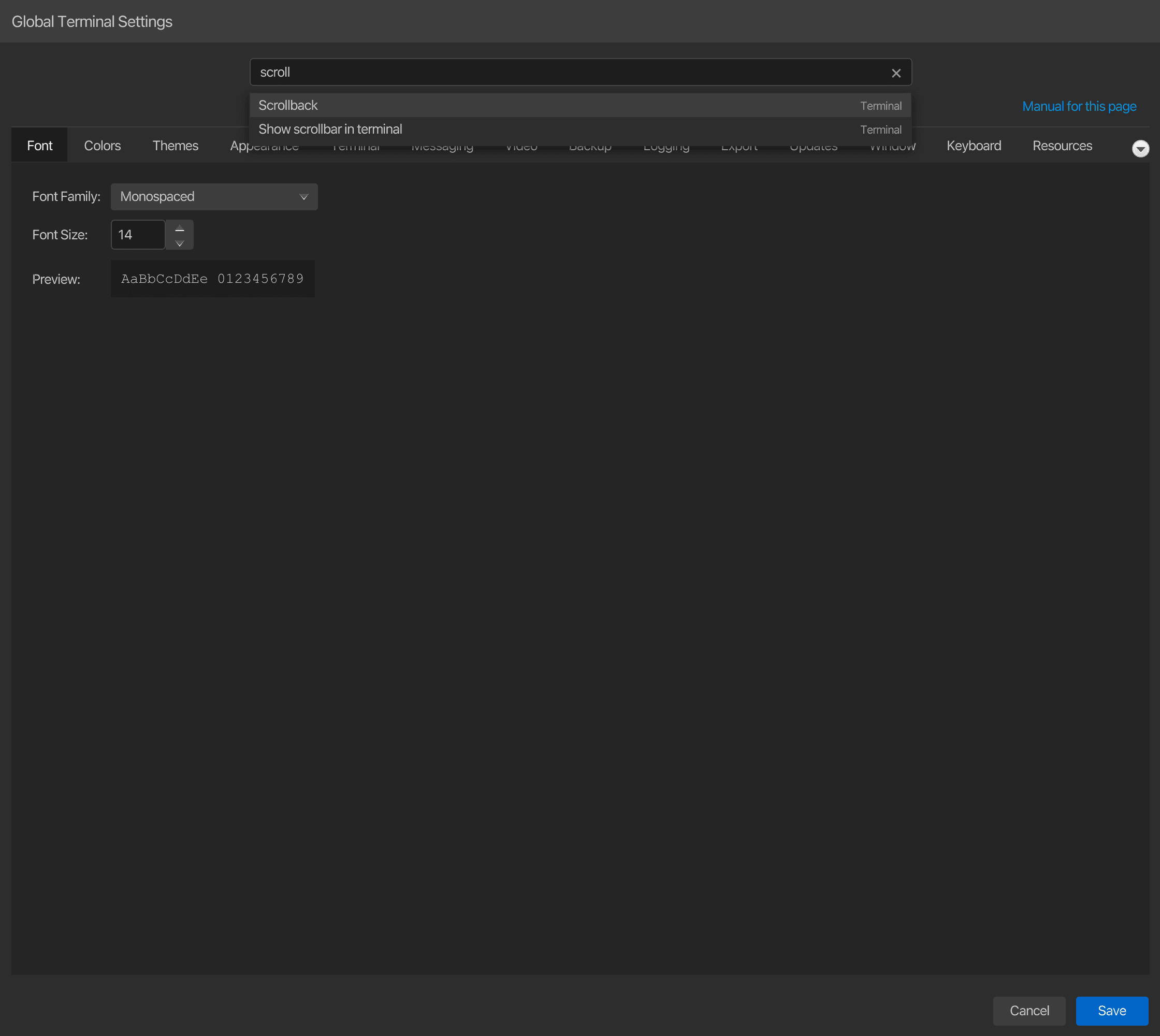
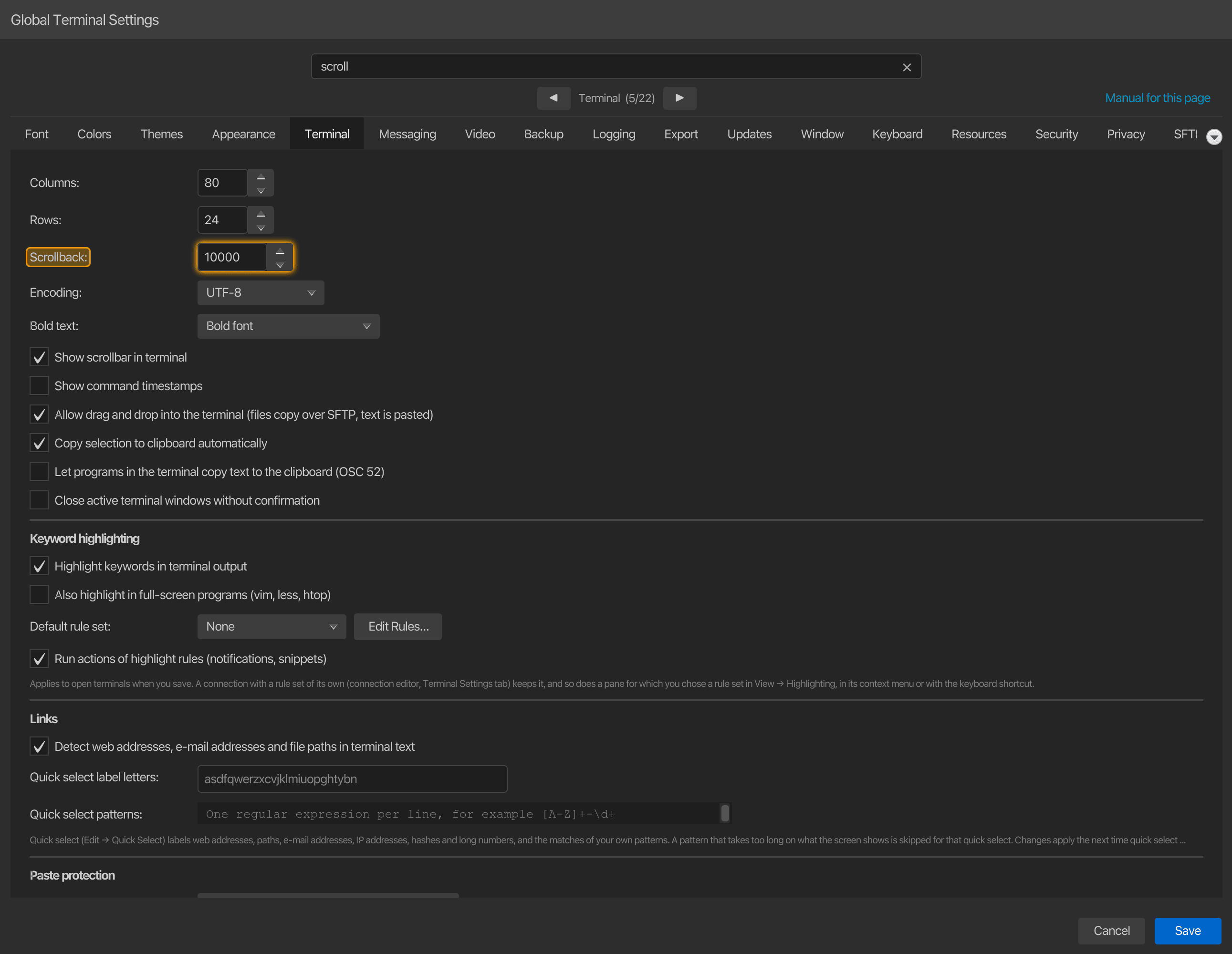
Die Suchzeile oben im Einstellungsfenster durchsucht alle Tabs auf einmal: die Beschriftungen, Kontrollkästchen, Schaltflächen und Abschnittsüberschriften, einschließlich Tabs, die Sie noch nicht geöffnet haben. Geben Sie mindestens zwei Zeichen ein, und die passenden Einstellungen werden unter dem Feld aufgelistet, jeweils mit dem Tab, auf dem sie sich befinden; ein ganzer Tab wird als Seite aufgelistet, wenn sein Name übereinstimmt. Groß-/Kleinschreibung, Akzente und Umlautschreibungen sind egal (schriftgroesse findet Schriftgröße), und jedes Wort muss übereinstimmen, daher findet terminal scroll Zurückscrollen auf dem Terminal-Tab. Einstellungen, die im aktuellen Zustand ausgeblendet sind, wie z. B. Felder eines anderen KI-Verbindungsmodus, werden nicht angeboten.
Klicken Sie auf ein Ergebnis oder wählen Sie es mit Up / Down aus und drücken Sie Enter: Der Dialog wechselt zu diesem Tab, scrollt die Einstellung in den sichtbaren Bereich, hebt sie zusammen mit den Bedienelementen in ihrer Zeile farblich hervor und setzt den Tastaturfokus auf ihr Bedienelement, sodass Sie es sofort ändern können. Die Hervorhebung verblasst nach wenigen Sekunden oder wenn Sie erneut suchen. Das ✕ am rechten Ende der Suchzeile leert diese mit einem Klick. Cmd+F (Ctrl+F unter Windows und Linux) springt von überall im Dialog zur Suchzeile, und Esc dort löscht zunächst die Suche, bevor der Dialog geschlossen wird; Enter in der Suchzeile speichert die Einstellungen nie.
Anleitung für jeden Tab
Anleitung zu dieser Seite rechts in der Navigationsleiste öffnet die integrierte Anleitung auf der Seite, die den aktuell angezeigten Tab dokumentiert – zum Beispiel die Terminal-Seite dieser Referenz, wenn der Terminal-Tab angezeigt wird, und die Anonyme Daten-Seite für den Datenschutz-Tab. Der Tooltip benennt den Tab. Die Anleitung öffnet sich in der Sprache der Benutzeroberfläche.
Einstellungsregisterkarten
| Registerkarte | Was es steuert |
|---|---|
| Aussehen, Themen & Schrift | (die sieben AtlantaFX-Themen und die korTTY-Designs), Terminal-Themen, Schriftfamilie & Größe, UI-Schriftgröße |
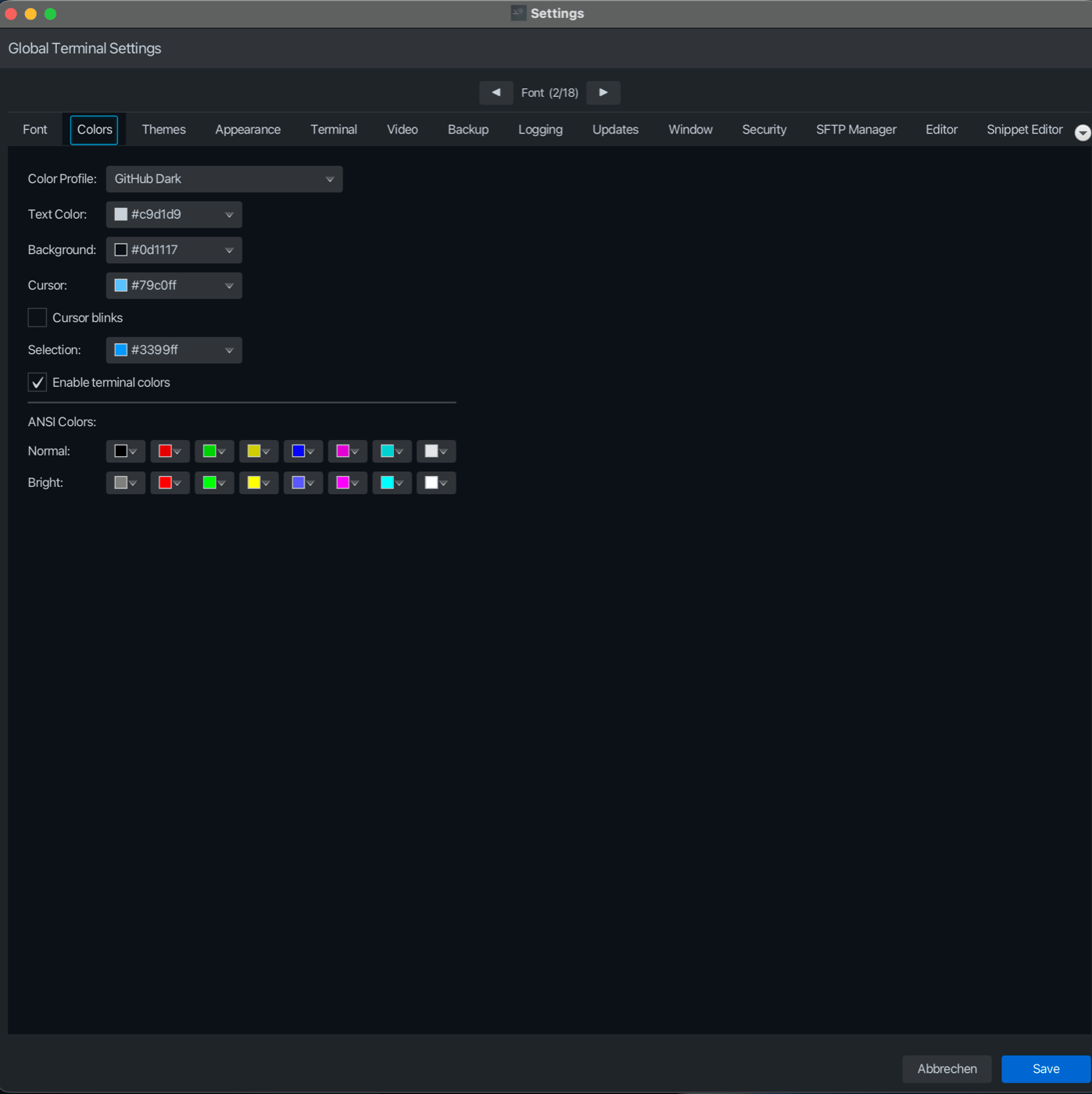
| Farben | Farbprofil, Text/Hintergrund/Cursor/Selection-Farben, Cursor-Blinken, die 16-Farben ANSI-Palette |
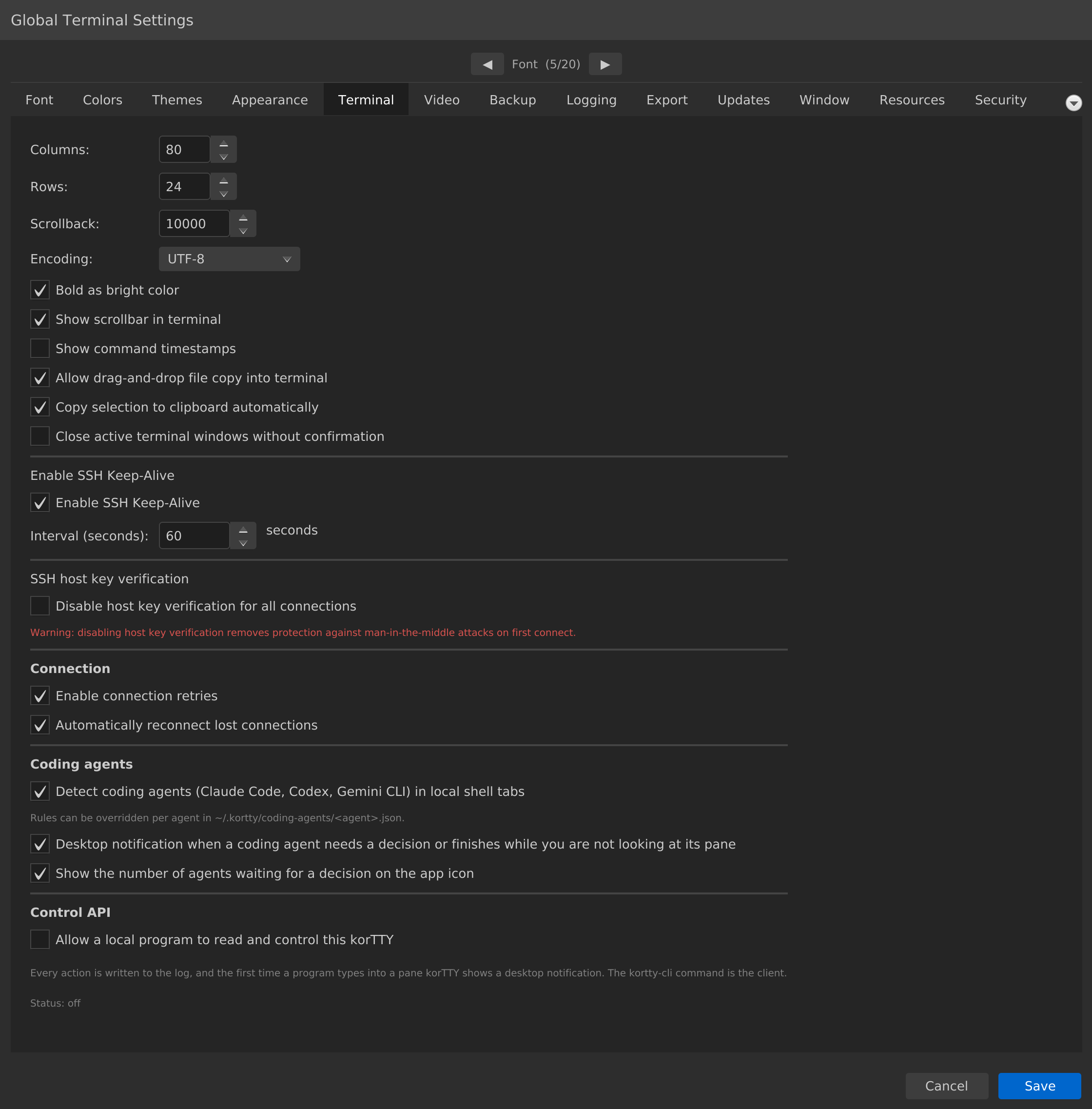
| Terminal | Spalten/Zeilen, Scrollback, Kodierung, Schlüsselwort-Hervorhebung, Schnell-Auswahl, Einfüge-Schutz, Shell-Integration, Links, SSH Keep-Alive, SSH-Host-Key-Prüfung, Verbindungsversuche, Drag-Drop, Zeitstempel, Coding-Agent-Erkennung, Steuerungs-API und MCP-Server |
| Messaging | Desktop-Benachrichtigungen für Coding-Agenten, Terminalereignisse und korTTY KI-Läufe; Benachrichtigungstiming |
| Video | Terminal recording / ffmpeg Videoexport |
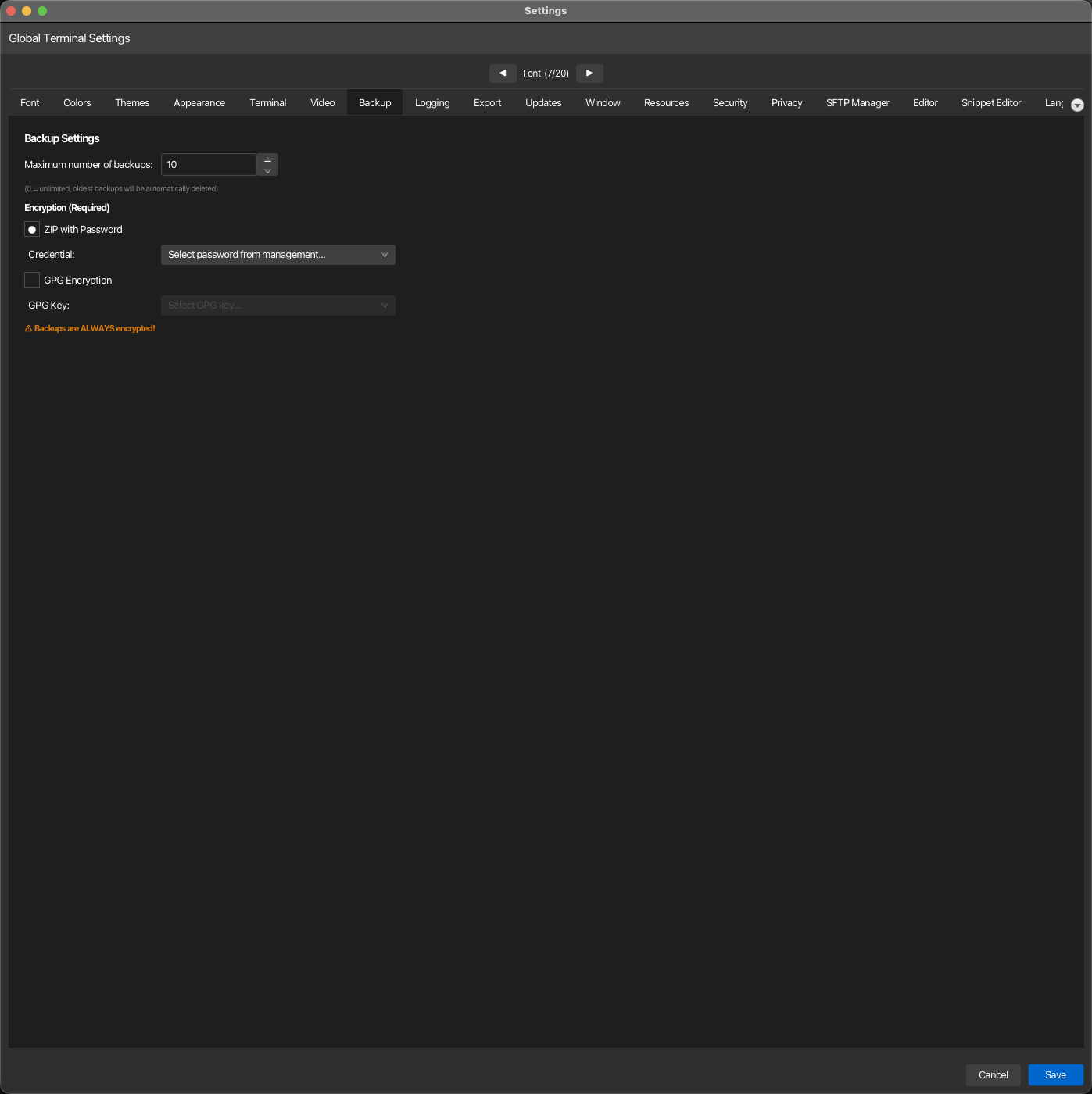
| Sicherung | Verschlüsselungstyp (ZIP-Passwort / GPG), maximale Sicherungsanzahl |
| Protokollierung | Terminal log directory and retention; session journal storage, AI summaries, interval and profile |
| Export | PDF-Wasserzeichen und Dokumentenfußzeile für exportierte Sitzungsjournale, KI-Chats und Code-Analyseberichte |
| Aktualisierungen | Automatic update checking and interval |
| Fenster | Symbolleisten-Icon-Größe, Fenster-Geometrie-Wiederherstellung, feste Geometrie, Dashboard-Zustand, Tab-Verhalten, was korTTY beim Start wiederherstellt |
| Tastatur | Eigene Tastaturkürzel für die Befehle von korTTY: ändern, entfernen oder zurücksetzen, mit einer Prüfung auf Tasten, die die Shell braucht, und auf Konflikte |
| Ressourcen | Opt-in JVM Heap/GC-Profil (Balanced / High / Maximum) für größere Workloads |
| Sicherheit | Passwortabfrage für Master-Passwort, Master-Passwort ändern, temporäre SSH-Schlüssel |
| Datenschutz | Einwilligung für anonyme Nutzungsstatistiken (Aptabase, EU/GDPR) |
| SFTP-Manager | SFTP-Tab Auto-Schließen, Remote-ZIP-Vorgaben, JobScheduler rsync-Binary |
| Editor | Cursortyp und Farbe für Editor-Tabblätter |
| Snippet Editor | Schriftart-, Farb- und Cursor-Überschreibungen für Snippet-Fenster |
| Sprache | UI-Sprachauswahl (8 integrierte) + Auto-Erkennung |
| Übersetzung | Externer oder lokaler KI-Übersetzungsanbieter, Zugangsdaten, Zielsprache, Sprachdatei generieren |
KI hat in diesem Fenster keinen Tab: jede KI-Einstellung, von den Funktionsschaltern und dem Terminal-Agent bis zu den Profilen, lokalen Modellen, Wissensspeichern und der KI-Skills-Bibliothek, befindet sich in KI > KI-Manager; siehe KI, Lokale Modelle und RAG-Wissensspeicher.
Vollständigkeit
Auf den Registerkartenseiten werden alle einzelnen Einstellungen aufgeführt. Die Abdeckung wird automatisch anhand der Einstellungsschlüssel der Anwendung überprüft, sodass keine Einstellung undokumentiert bleibt.
Visuelle Referenz
Einige der Konfigurationsregisterkarten (die einzelnen Registerkartenseiten zeigen jede im Detail):
Farben — Terminalpalette, Cursor und ANSI-Farben
Terminal – Scrollback, Kodierung, Keep-Alive, Wiederholungsversuche
Backup – maximale Backups, ZIP-Passwort oder GPG-Verschlüsselung