Sicherheit
Auf dieser Registerkarte werden die Optionen für die Sicherheit des Passwort-Tresors und die SSH-Schlüsselauthentifizierung verwaltet. Öffnen über Konfiguration → Globale Einstellungen → Sicherheit; in ~/.kortty/global-settings.xml gespeichert.
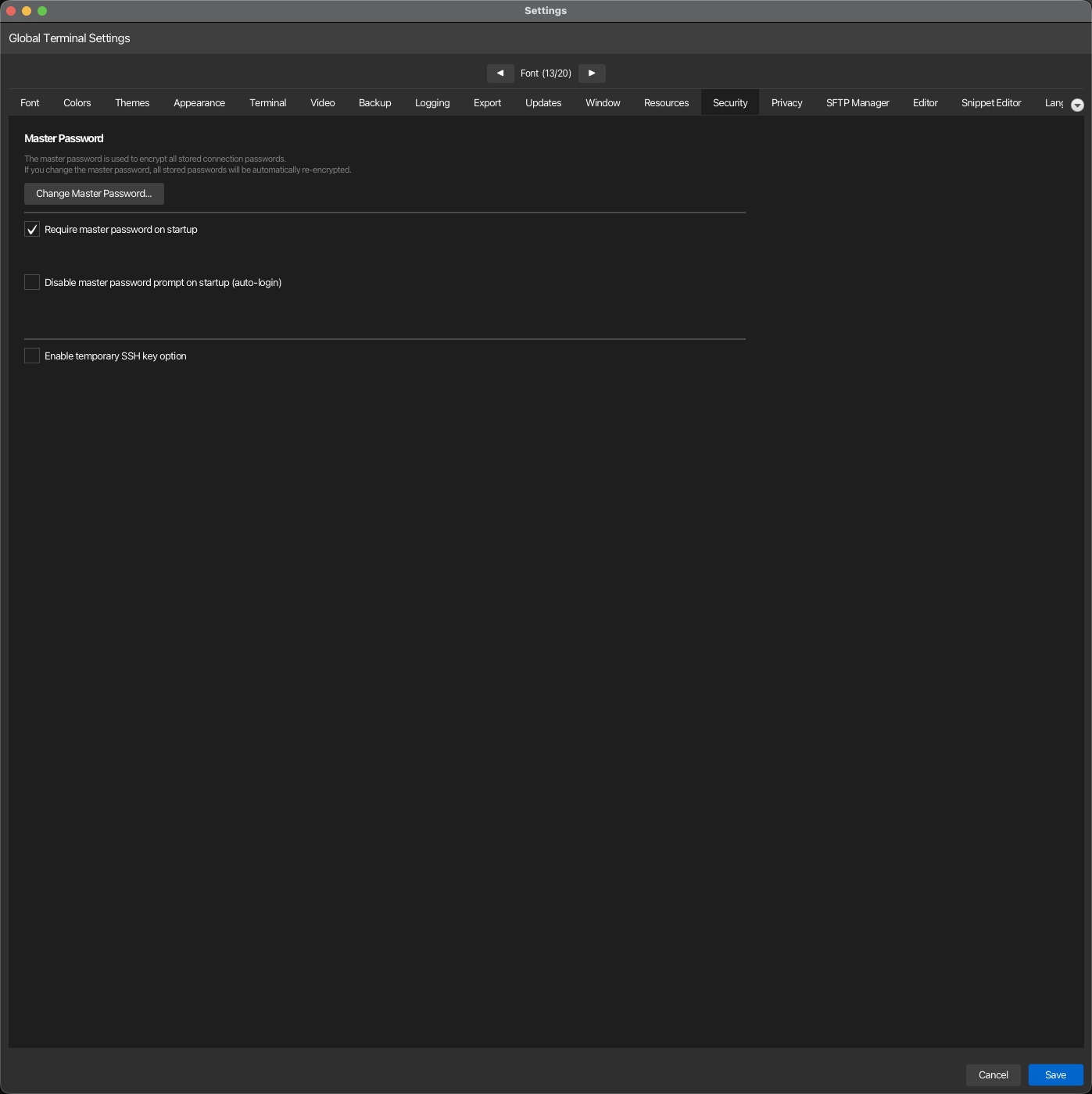
| Einstellung | Typ | Werte | Standard | Gespeichert als |
|---|---|---|---|---|
| Master-Passwort ändern | Schaltfläche | — | — | — |
| Master-Passwort beim Programmstart anfordern | Schalter | — | Ein | requireMasterPasswordOnStartup |
| Master-Passwort-Aufforderung beim Programmstart deaktivieren (automatischer Login) | Schalter | — | Aus | skipMasterPasswordPrompt |
| Temporäre SSH-Schlüsseloption aktivieren | umschalten | – | Aus | temporarySshKeyEnabled |
| Standard-Isolation | dropdown | Keine, Eigener Prozess, Eigener Prozess + Sandbox | Keine | connectionIsolationDefault |
Der Tab ist in drei Abschnitte unterteilt, jeder mit einem In der Anleitung öffnen Link, der den entsprechenden Abschnitt darunter öffnet: Master-Passwort, Temporäre SSH-Schlüssel und Sitzungs-Isolation.
Master-Passwort
Das Tresor, das Ihre Passwörter, SSH-Schlüssel-Passphrasen und API-Schlüssel schützt, ist mit dem Master-Passwort gesperrt. Die drei Optionen und der Master-Passwort ändern-Button steuern, wann korTTY danach fragt.
Master-Passwort beim Start
Wenn "Master-Passwort beim Programmstart anfordern" deaktiviert ist, startet korTTY mit dem Tresor gesperrt: verschlüsselte Passwörter und SSH-Schlüssel können nicht entschlüsselt werden, bis Sie ihn mit Konfiguration → Sicherheit → Tresor entsperren… oder dem Tresor entsperren…-Button einer beliebigen "Tresor gesperrt"-Nachricht entsperren. Dies ist ein Sicherheitsrisiko und sollte nur deaktiviert werden, wenn Sie die Konsequenzen verstehen.
Auto-Login speichert Ihr Master-Passwort auf der Festplatte
Das Aktivieren von "Disable master password prompt on startup" lässt korTTY Ihr Master-Passwort merken — gespeichert in ~/.kortty/master.autounlock, verschlüsselt mit AES-256-GCM aber mit einem Schlüssel, der in korTTY eingebaut ist, sodass es verschleiert statt geheim ist, mit Dateiberechtigungen nur für den Eigentümer — und öffnet das Tresor automatisch bei jedem Start, ohne Dialog. Im Gegensatz zum Deaktivieren der obigen Option bleiben verschlüsselte Daten (KI-Profile, SSH-Passwörter, Anmeldedaten) nutzbar, weil der Tresor tatsächlich geöffnet ist. Kompromiss: Jeder, der Ihren ~/.kortty-Ordner oder ein Backup lesen kann, kann dann alle gespeicherten Passwörter, SSH-Schlüssel und API-Schlüssel entschlüsseln — die Dateiberechtigungen sind der einzige verbleibende Schutz. Bei einem brandneuen Profil richtet korTTY automatisch ein Standardpasswort ein, sodass die App ohne Eingabe starten kann. korTTY bittet Sie um Bestätigung, bevor es aktiviert wird, und ist nur für einmalige/Testumgebungen wie eine VM gedacht. Während die automatische Anmeldung aktiviert ist, wird Master-Passwort beim Programmstart anfordern ausgeschaltet und ausgegraut — die beiden Optionen sind gegenseitig ausschließend. Eine Unternehmensrichtlinie, die ein Master-Passwort verlangt, überschreibt diese Option.
Unbeaufsichtigter erster Start (Automatisierungs-/Test-VMs)
Um korTTY ohne Dialog aufzurufen – selbst bei einem brandneuen Profil, das noch nie freigeschaltet wurde – erstellen Sie ~/.kortty/global-settings.xml vor dem ersten Start mit bereits aktivierter Option:
<?xml version="1.0" encoding="UTF-8" standalone="yes"?>
<globalSettings>
    <skipMasterPasswordPrompt>true</skipMasterPasswordPrompt>
</globalSettings>
Bei dem ersten Start legt korTTY das Standard-Master-Passwort kortty-auto automatisch fest und entsperrt den Tresor, sodass skriptbasierte oder CI-Abläufe keine Interaktion erfordern. Wenn Sie später den automatischen Login auf einem solchen Profil deaktivieren, ist kortty-auto das Passwort, das eingegeben werden muss — ändern Sie es sofort über Master-Passwort ändern, falls das Profil langfristig verwendet werden soll. Dies ist ausschließlich für kurzlebige oder Testumgebungen vorgesehen — siehe die Sicherheitswarnung oben.
Schaltfläche „Master-Passwort ändern“
Öffnet einen Dialog, der nach dem Aktuellen Passwort, dem Neuen Passwort (mindestens 6 Zeichen) und einer Wiederholung des Neuen Passworts bestätigen fragt; Ändern wendet es an. korTTY lehnt ein falsches aktuelles Passwort, ein neues Passwort unter sechs Zeichen und eine Diskrepanz zwischen den beiden neuen Eingaben ab, jeweils mit einer eigenen Meldung. Bei Erfolg meldet es, wie viele Geheimnisse neu verschlüsselt wurden: jedes mit Master-Passwort geschützte Geheimnis wird mit dem alten Passwort entschlüsselt und mit dem neuen verschlüsselt — Verbindungs-Passwörter und Schlüsselpassphrasen, Jump-Server-Passwörter, SSH-Schlüsselpassphrasen, gespeicherte Anmeldedaten, KI-Profil API-Schlüssel, KI-Skill-Provider-Geheimnisse und die anderen KI/Übersetzungsschlüssel sowie RAG- und Job Scheduler-Geheimnisse — sodass nichts nach der Änderung unlesbar wird.
Das neue Passwort übernimmt erst dann, wenn alle Speicher übertragen wurden, sodass ein Fehler während des Prozesses das alte Passwort behält statt Sie teilweise auszuschließen. Wenn ein einzelnes Geheimnis nicht übertragen werden kann (zum Beispiel ein Geheimnis, das mit einem anderen Passwort verschlüsselt wurde), bleibt korTTY das alte Wert unverändert, meldet, wie viele Elemente betroffen sind, und notiert dies im Protokoll — diese Geheimnisse behalten das alte Passwort und müssen manuell neu eingegeben werden. Wenn automatischer Login aktiv ist, wird das in ~/.kortty/master.autounlock gespeicherte Passwort mit dem neuen Master-Passwort überschrieben, sodass das automatische Entsperrungsverhalten nach der Änderung weiterhin funktioniert.
Temporäre SSH-Schlüssel
Ein temporärer SSH-Schlüssel ist ein privater Schlüssel, den Sie für eine Sitzung einfügen, anstatt eine Schlüsseldatei auszuwählen. Temporären SSH-Schlüssel aktivieren zeigt oder verbirgt diese Option überall; sie ist unabhängig von den oben genannten Master-Passwort-Optionen.
Temporäre SSH-Schlüssel und der Temp-Ordner
Mit dieser Option aktiviert, bietet der Connection-Manager und die Schnellverbindung einen temporären SSH-Schlüssel: einen privaten Schlüssel, den Sie für die Sitzung einfügen statt einer Schlüsseldatei. Für Terminal-Tabs, Aufteilungen und SFTP liest korTTY einen temporären Schlüssel im Speicher und schreibt ihn niemals in eine Schlüsseldatei; eine gespeicherte Verbindung behält den Schlüssel nur verschlüsselt mit Ihrem Master-Passwort in connections.xml. Geplante Aufgaben authentifizieren sich ebenfalls im Speicher, mit einer Ausnahme: weil ein Rsync-Job den Schlüssel an das externe ssh übergibt, schreibt der JobScheduler den temporären Schlüssel eines Rsync-Jobs in eine nur für den Besitzer lesbare Datei im Systemtemp-Ordner und löscht ihn, wenn die Verbindung des Jobs geschlossen oder fehlschlägt. Schlüsseldateien, die frühere Versionen im Temp-Ordner zurückgelassen haben (kortty_temp_key_*.key, kortty_scheduler_key_*.key), werden beim nächsten Start gelöscht, sofern sie Ihnen gehören und älter als fünf Minuten sind.
Sitzungs-Isolation
Standard-Isolation
Standard-Isolation: im Abschnitt Sitzungs-Isolation ist die Isolation jeder Verbindung, die selbst keine festlegt und deren Ordner keine festlegen; eine Verbindung und ein Ordner können im Connection-Manager eine eigene wählen, die Ordnerstufen werden als connectionGroupIsolation gespeichert. Der Abschnitt zeigt, ob dieser Computer eine funktionierende Sandbox hat oder warum nicht, und welche Verbindungsarten in dieser Version isoliert werden können. Mit einem Minimum der Organisation werden die Stufen darunter nicht angeboten, und der Abschnitt nennt das Minimum. Siehe Sitzungs-Isolation.