Jump Server (Bastion Host)
A jump server (bastion host) acts as an intermediate gateway to reach servers on a private network. korTTY tunnels the connection through a jump server so you can reach an internal system from your local machine without direct network access to it.
Connection flow
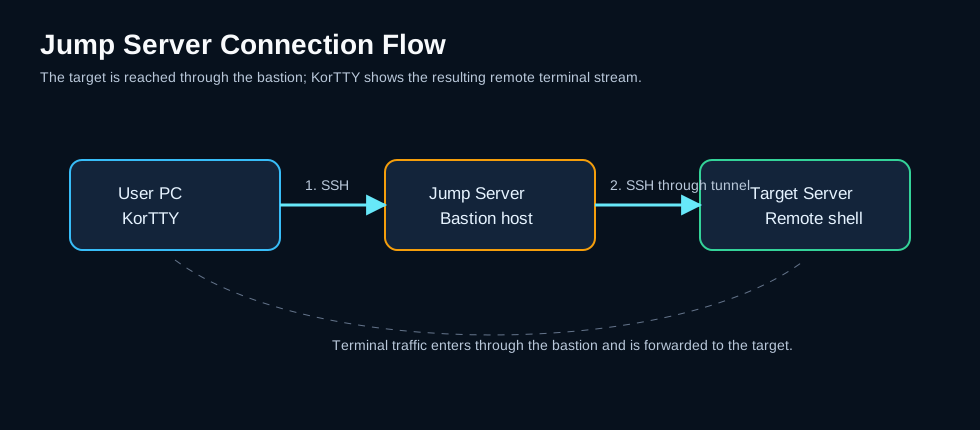
korTTY authenticates to the jump server with the jump server's own credentials, opens a tunnel through it, and then opens the real SSH session to the target host through that tunnel. The target's credentials are used only for the target, and the jump server's credentials only for the jump server — neither host is offered the other's password or key.
Both SSH terminal and SFTP connections to the target route through the jump server; there is nothing extra to configure for SFTP. This works whatever the target's own authentication is — password, keyboard-interactive, SSH key or a temporary SSH key: a stored jump server password is decrypted with your master password in every case.
Warning
Mosh connections cannot go through a jump server: a Mosh session runs over UDP, which the jump server's SSH tunnel (TCP) does not forward. korTTY refuses the combination up front — the Jump Server tab warns as soon as it is configured, and connecting fails immediately with a clear message instead of stalling after the SSH bootstrap. Use the SSH protocol for targets behind a bastion, or disable the jump server.
Configuration
To configure a jump server for a connection:
- Open the Connection Manager and edit (or create) a connection.
- Go to the Jump Server tab.
- Tick Enable Jump Server / Auto-Hop.
- Enter the jump server's details:
- Jump server host — hostname or IP address of the jump server
- Port — SSH port (default: 22)
- Username — login username for the jump server
- Choose an Authentication method:
- Password — the password is stored encrypted with your master password. Leave the field empty when editing to keep the previously stored password.
- SSH key file (no passphrase) — the path to an unencrypted private key file. Passphrase-protected keys are not supported for the jump hop.
- Click Save.
When the jump server cannot be used
korTTY decrypts a stored jump server password before it contacts the jump server. If the stored jump password cannot be used — none is stored, the master password vault is locked, or the stored value cannot be decrypted — connecting stops at once with a message that says so, without contacting the jump server, without asking about its host key and without working through the retry count. Unlock the vault with Configuration > Security > Unlock Vault… (see Unlocking the vault later) or store the password in the connection's Jump Server tab, then reconnect.
An incomplete jump setup (no username, or key authentication without a usable key file) and a jump-server host key you rejected are also reported once instead of being retried, because another attempt would fail identically. A jump server that cannot be reached, or a network error on the way, is still retried like any other connection failure.
Host key verification
The jump server's host key is verified on first use exactly like any other host: korTTY shows the key's SHA-256 fingerprint and asks you to confirm it, then pins it. On later connections a changed jump-server key is refused, the same trust-on-first-use protection the target host gets. When the connection was opened from a terminal tab or the SFTP manager, the changed-key alert offers Review and Replace… for the jump server as well, under the same rules as for the target (see SSH host-key verification). The bastion is always checked strictly: relaxing host-key verification applies to target hosts only, never to the jump hop.
This holds even when host-key verification has been relaxed for the target: the per-connection, per-group and global opt-outs never cover the bastion, so its key is always verified strictly. See Relaxing host-key verification.
The target host is verified under its own name even though the transport goes through the tunnel, so a compromised bastion cannot substitute a different target host key unnoticed.
When to use it
- Target servers are behind a firewall and only reachable through a bastion host.
- Security policy requires routing through a gateway.
- Internal infrastructure uses private addresses and needs an intermediary for access.
Note
Jump server passwords are stored encrypted with your master password, alongside the connection's own credentials. Because the stored password is never shown back, editing the connection with an empty jump-server password field keeps the stored one; type a new value only to change it. If the master password vault is locked when you save a new jump password, korTTY offers Unlock Vault…; if the vault stays locked, korTTY says that the jump server password cannot be saved, keeps the stored password as it was, and still saves the other settings of the connection.