Architecture (Developer)
korTTY is a modular JavaFX SSH client built on a layered architecture. This guide describes the core modules, their responsibilities, dependencies, and how they interact to deliver a seamless terminal experience with advanced features like job scheduling, AI integration, and terminal effect plugins.
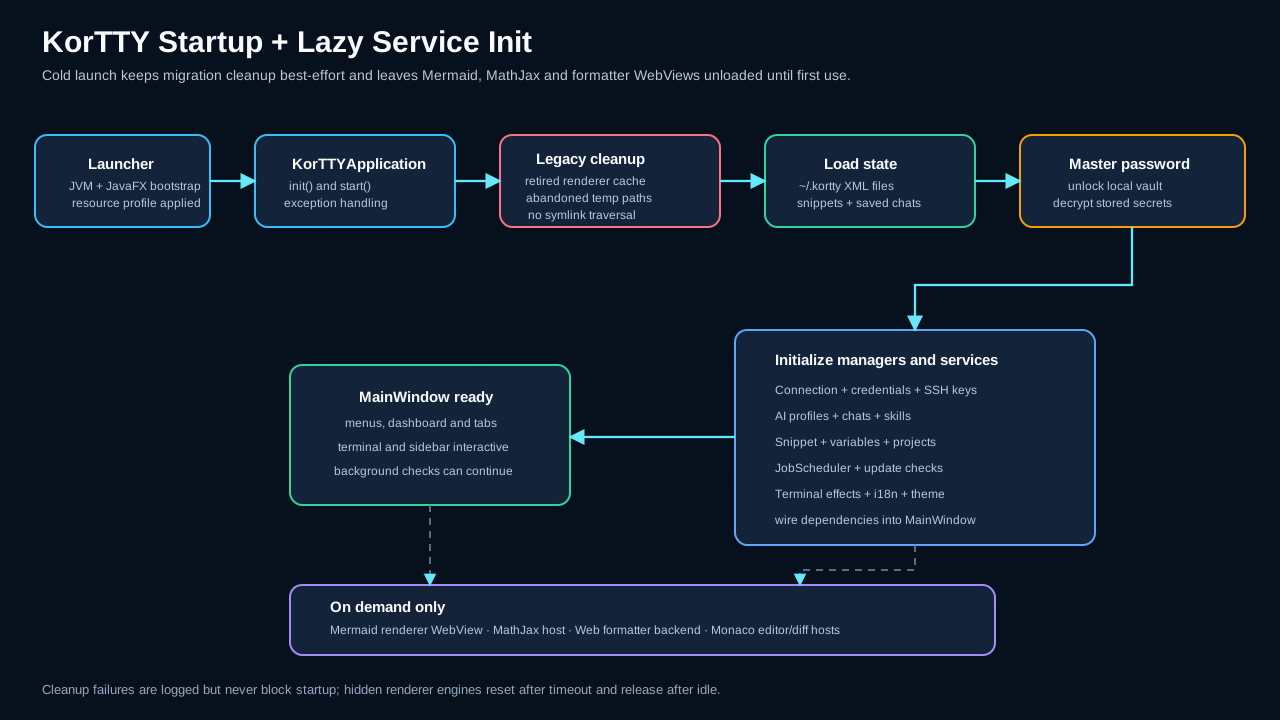
Architecture Overview
The following diagram shows the main components of korTTY and how they relate:
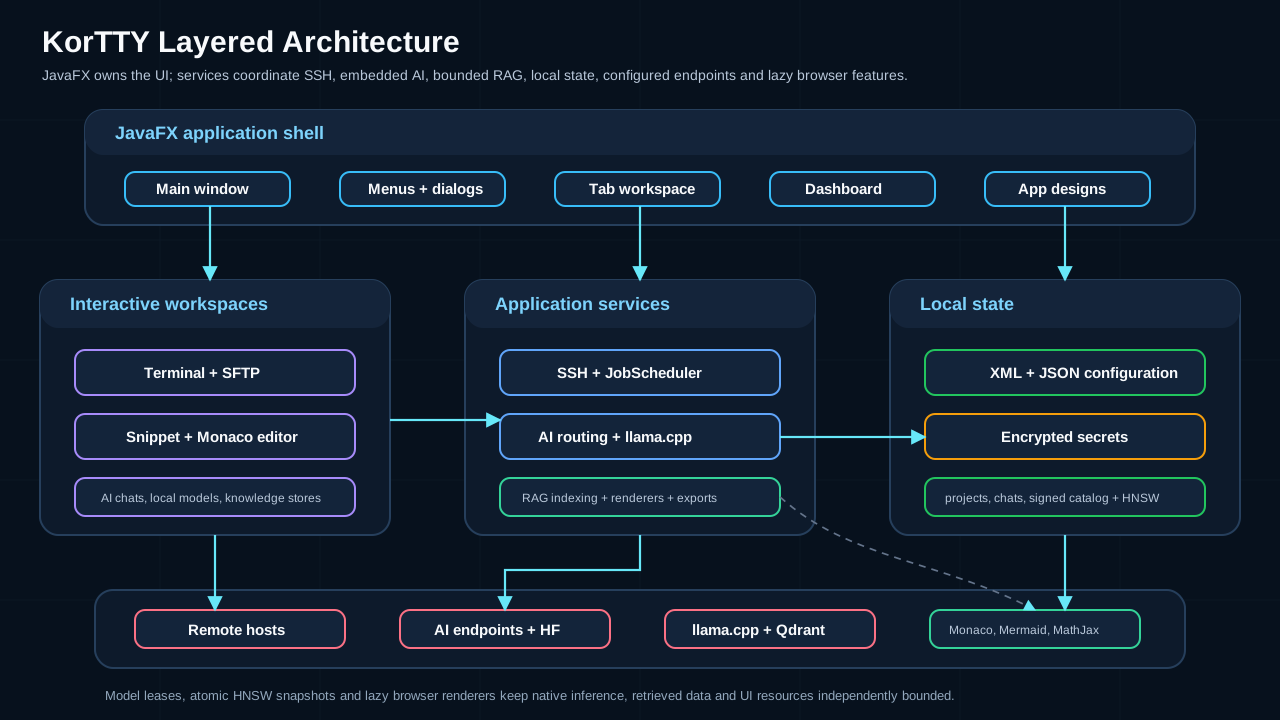
Modules and Dependencies
KorTTY is organized into distinct functional modules. The diagram below groups them by function:
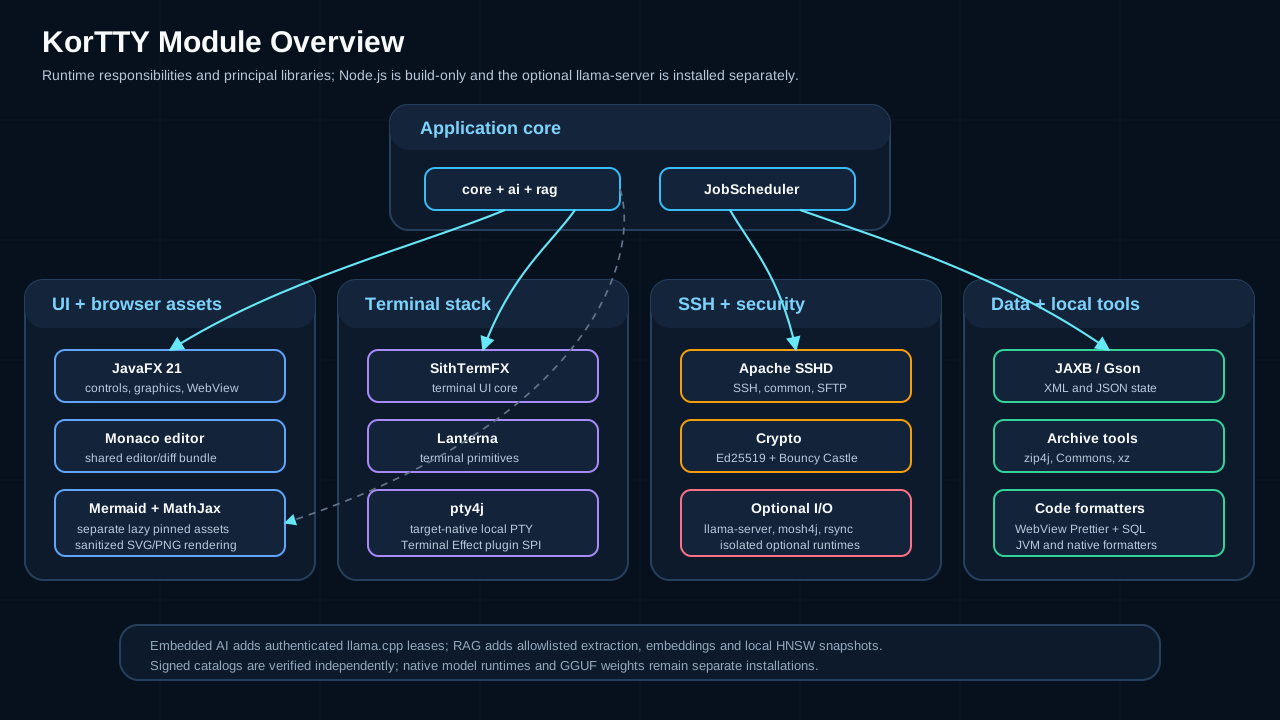
Module Breakdown
| Module | Purpose | Key Classes |
|---|---|---|
| core | SSH connectivity, shared interactive host-key trust, session management, AI integration, terminal automation | SshTtyConnector, SshHostKeyTrustManager, AiChatManager, TerminalAgentService, Mosh4jTtyConnector |
| ai | Signed model/prompt catalog, Hugging Face metadata/downloads, embedded llama.cpp and MLX runtimes, and signed runtime packages | AiCatalogService, HuggingFaceClient, LlamaRuntimeManager, LlamaRuntimePackageInstaller, EmbeddedMlxAiService, MlxRuntimeLocator |
| rag | Safe source scanning, extraction, chunking, embeddings, vector stores, synchronization, and bounded retrieval | RagSourceScanner, RagSourceSynchronizer, LocalHnswStore, RagRuntimeService |
| ui | JavaFX user interface, dialogs, terminal views, SFTP manager | TerminalView, TerminalTab, ConnectionEditDialog, SFTPManagerTab, SnippetEditDialog |
| model | Domain objects for connections, credentials, snippets, jobs | ServerConnection, StoredCredential, Snippet, JobSchedule |
| jobscheduler | Background job scheduling and execution | JobSchedulerService, JobSchedulerJobRunner, JobJournalEntry |
| security | Master password, encryption/decryption, password vault | MasterPasswordManager, EncryptionService, PasswordVault |
| persistence | XML serialization, file I/O, repository pattern | XMLConnectionRepository, HistoryStorage |
| plugin | Terminal effect plugins (ServiceLoader SPI) | TerminalEffectPlugin, TerminalEffectSession |
| power | Activity-aware sleep and App Nap management per platform | PowerManagementCoordinator, MacPowerManagementBackend |
| telemetry | Consent-gated anonymous usage events | TelemetryService, Telemetry |
| control | Default-off local control API: transport, token, verbs, event bus (see Control API) | ControlApiServer, ControlVerbs, ControlSurface, ControlEventBus, ControlApiGate |
| cli | The kortty-cli client that speaks the control API (see Control CLI) |
KorttyCli |
| teamwork | Collaboration and remote access features | Team-based session sharing and coordination |
| jmx | Java Management Extensions monitoring | SSHClientMonitor, SSHClientMonitorMBean |
| codingagent | Coding-agent awareness: detects terminal coding agents in panes, tracks their state, and feeds the Coding Agents panel and notifications | CodingAgentDetector, CodingAgentMonitor, CodingAgentRegistry, CodingAgentService |
| isolation | Session isolation levels and the sandboxed local shells; SSH sessions run in session worker processes (core.worker) |
IsolationLevel, IsolationSettings, SandboxBackend, MacSandboxBackend, BubblewrapSandboxBackend, SessionWorkerProcess |
| paste | Paste protection: inspects pasted text and decides whether to confirm, sanitize or pace it | PasteGuard, PasteInspection, PasteRules, PastePacer |
| policy | Enterprise policy file (kortty-policy.toml): managed settings, restrictions and encrypted policy values |
PolicyManager, PolicyLoader, EffectivePolicy, ServerAccessPolicy, PolicyValueCipher |
| shellintegration | Shell integration (prompt marks, command status, notifications) and per-pane activity tracking | ShellIntegrationInjection, ShellIntegrationWrapperDirectory, PromptNavigator, CommandBlockStore |
| perf | Opt-in UI timing trace for performance work | PerfTrace |
| platform | Platform support for packaged builds, such as Flatpak | FlatpakSupport |
| update | Version checking and update notifications | Update service and version metadata |
SithTermFX Terminal Engine
KorTTY uses SithTermFX 1.2.7 as its primary terminal emulator, built from source during the build process. SithTermFX provides:
- Terminal emulation: VT100/xterm-compatible terminal rendering powered by a custom JavaFX control
- OSC 8 hyperlinks: Clickable explicit hyperlinks printed by programs. korTTY replaces SithTermFX's default link handler in every pane with its own allowlist (
http,https,ftp,ftps,mailto, strictly parsed, at most 8 KB, no control or bidi characters,mailtolimited to recipients, subject, body and in-reply-to) and opens links through JavaFXHostServices. Links open only on a single, still Cmd/Ctrl+click without Alt (TerminalLinkClickPolicy.isFollowLinkGesture, user decision D2). korTTY's settings provider answers SithTermFX'sisFollowLinkGesturewith that rule, and SithTermFX 1.2.3 follows an OSC 8 link only on a still, single primary click the rule accepts, so a plain click, a double or triple click and a drag release on a link act as on other text, word and line selection included. TheKorttyLinkInfothat SithTermFX then navigates hands itself to its pane (KorttyTerminalPanel.followLink), which opens it only when the primaryMOUSE_CLICKEDfilter thatTerminalLinkClickPolicyinstalls on the canvas noted that same click, with the gesture, on that same link, so the gesture holds under any settings provider and no navigation bypasses the checks below. The same filter opens a link korTTY found in plain text itself, by a pure decision table, and consumes that click with a focus request, so the split pane still tracks the focused pane.news:and other targets stay plain text, and afile:target becomes a link only in a pane that opens files as text (see below), so terminal output never reachesjava.awt.Desktop.openand cannot launch a local file. Panes keep SithTermFX's defaultHOVER_WITH_BOTH_COLORSmode, in which linked text keeps its own colors and attributes, including SGR changes inside the link (since SithTermFX 1.2.3), and is underlined while the gesture is held over it, andTerminalScreenRendererrecords a link cell withHyperlinkStyle.getUnderlyingStyle(), the style of the text beneath the link. korTTY registers no SithTermFXHyperlinkFilter: links in plain text are found on demand instead, so they cost nothing while output arrives and open only through korTTY's gate;NoHyperlinkFilterGuardTestfails the build if a filter is added.TerminalLinkResolveris the click policy's hit resolver: under the buffer lock it returns the OSC 8 link of the clicked cell, or else runsTerminalLinkDetectorfor web and e-mail addresses over the logical line around the cell, bounded to ±16 wrapped rows and 4096 characters, and drops a token that may run on past that window instead of opening it cut short. The kinds come from a per-pane supplier that readsGlobalSettings.terminalLinkDetectionEnabledon every click, so detection costs nothing while output arrives.TerminalLinkHoverControllerresolves the same way only when the mouse reaches another cell: aMOUSE_MOVEDhandler added after SithTermFX's own sets the canvas cursor explicitly on every cell change (HAND only for a link that can open), draws the underline of a plain-text link asLines in the pane'sLINKSlayer (TerminalSplitPane.paneOverlay, an unmanaged, mouse-transparentPanein the pane wrapper at a negative view order, placed through scene coordinates because the wrapper also holds the timestamp gutter and the agent panel) and shows a tooltip withTerminalLinkOpener.displayTarget(punycode host, percent-encoded controls and bidi characters, shortened to about 200 characters without cutting the host). It tears down on exit, drag, scroll, non-modifier key, pane or window focus loss and scene removal, and while a link is shown it follows a buffer model listener (coalesced onto the FX thread) and canvas resizes to re-resolve. An OSC 8 click whose visible text is a URL on another host than the target (TerminalLinkOpener.visibleHostMismatch) opens only afterTerminalLinkMismatchDialog, asked after the click is handled, with Cancel as the default button. The terminal context menu reaches the same links without a modifier:TerminalLinkContextMenuadds a canvasMOUSE_PRESSEDfilter that resolves the link under every right-button press (any other press forgets it), andTerminalSplitPane.createFullContextMenuputs Open Link (the click's open path, mismatch question included) and Copy Link Address (throughKorttyClipboard, so the internal clipboard mode applies; an OSC 8 link'stoASCIIString()target, a plain-text address as printed) above the edit entries for a link with a target. Files go the same ways without a browser:TerminalFileLinkis a path the detector found (Kind.PATH, split byTerminalPathToken) or an OSC 8file:target thatfromFileUriaccepts (absolute path, no//network share, no backslash, no control, bidi or format characters after decoding, a host without user name or port).KorttyOsc8LinkInfoProvidercreates afile:link only while the pane'sTerminalFileLinkHandleris enabled (asked on the emulator thread), whichTerminalViewmakes true only for SSH and local-shell panes while aTerminalPathOpenHandleris set, andMainWindowsets one only when the policy'sloadIntoSnippetEditoris notDENY; the same condition addsPATHto the pane's plain-text link kinds. The pane's shared lookup drops the file of a link the handler does not accept (an OSC 8 host that is not empty,localhost, the connection host, the prompt host or the local host name, by first DNS label), so the hover, the click and the context menu agree. Opening resolves the path withRemoteTextFileSelectionSupport.resolveRemotePath/resolveLocalPath(absolute,~, and relative against the working directory at click time, which is looked up only for a relative path; UNC and device paths refused before and after resolving) and reads it through the same reader as Open in Snippet Editor, with the foreign-session guard, regular-file and UTF-8 checks and a 10 MB cap for SFTP and local reads that also stops a file growing during the read. A file from an OSC 8 link opens read-only:ExternalFileActionConfiggets no overwrite or save-as action and alockedReason.TerminalLinkHoverControlleradds itsMOUSE_MOVEDhandler fromKorttyTerminalPanel.init(), after SithTermFX adds its own there, so the cursor korTTY sets wins also over an OSC 8 link it does not open. - Quick select: Edit → Quick Select (Cmd/Ctrl+Shift+Space) labels what the focused pane shows. The chord is a
MainWindowconstant routed through the scene shortcut router (scope: a terminal tab with the keyboard focus inside it; residue: space or NUL) and set on the menu item, which is disabled outside terminal tabs.QuickSelectScreenreads the visible rows at the panel's scroll origin under the buffer lock, joins wrapped rows within the viewport (sliced to the detector's 16 KB input cap) and runsTerminalLinkDetectorfor every kind, dropping a token that runs on past the viewport; the user's own patterns (QuickSelectPatterns, fromGlobalSettings.terminalQuickSelectPatterns: at most 16 of at most 512 characters, compiled once per change of the list) run over the same scanned text and come out asKind.CUSTOM, each through aDeadlineCharSequencewith 10 ms per line and 100 ms for all of one capture, a pattern that overruns being skipped for the rest of the capture, and a pattern match replaces the built-in matches it overlaps when it is at least as long as each of them;QuickSelectLabelsassigns prefix-free labels from the user's alphabet (terminalQuickSelectAlphabet, validated byalphabetProblem, the default when unusable; one letter per text up to the alphabet's size, otherwise two) bottom row first, one per distinct text;QuickSelectSessionis a pure state machine overKeyCodeand Shift (modifier keys and the starting chord are ignored, a label copies, Shift on its last letter opens, Backspace edits the prefix, Escape and any other key cancel).TerminalQuickSelectControllerinstalls the split pane's firstKEY_PRESSED,KEY_TYPEDandINPUT_METHOD_TEXT_CHANGEDfilters (beforeTerminalView's own, so before the agent input lock and the per-pane broadcast mirror): while a session runs every key, typed character and input-method event is consumed, andQuickSelectInputGuardreusesKeyTypedResidueGuardto swallow the last key'sKEY_TYPEDonce plus any input-method text until the next key press. It drawsRectangleboxes and inline-styledLabelchips (pane colors inverted, terminal font) into the pane'sLINKSlayer through scene coordinates (TerminalCellGeometry.boxes), copies throughKorttyClipboard, opens a URL, an e-mail address or, where the pane opens files (KorttyTermWidget.opens), a path through the widget'sopenLink(the Cmd/Ctrl+click path) and copies whatever it does not open, and ends on a mouse press, canvas focus loss, a canvas move or resize, a scroll-bar change, a font-size change (TerminalView.reinitPaneFont) or scene removal; a buffer model listener, coalesced onto the FX thread, drops the matches whose cells no longer hold their captured text and ends the session when none is left. - Session integration: Direct JAXB marshaling of terminal state for session recording and replay
- Color support: Configurable ANSI and TrueColor handling with per-connection overrides
- Scrollback memory limit and compression: Since SithTermFX 1.2.6 a pane's history is bounded by an estimate of its heap as well as by its line count.
KorTTYSettingsProvideranswersgetBufferMaxMemoryBytes()andisScrollbackCompressionEnabled()fromConnectionSettings.scrollbackMemoryMbandscrollbackCompression, andTerminalView.applyScrollbackMemoryhands a saved change to every open pane'sTerminalTextBuffer. With compression on, a low-priority SithTermFX thread packs history lines into deflated blocks of up to 128 lines once a pane has had no output for 1.5 s, holding the buffer lock for a few milliseconds at a time; the rows on screen with a screenful around them, the newest screenful and lines with a custom highlighting stay unpacked, and nothing is packed while find results are shown. A packed line keeps itsTerminalLineidentity, wrapped flag and styles, soScrollbackTrimTracker, the command marks and the keyword highlighter, which all anchor on line identity, are unaffected; drawing a line or reading its entries unpacks its block,getText()decodes without unpacking - Hyperlink boundary fix: Hyperlink hit-testing rejects the non-existent row at
line == height, preventing bottom-rowTerminalTextBufferrange errors. korTTY carried this as a pinned patch until it shipped upstream in SithTermFX 1.2.3;TerminalPanelBoundaryPatchTestpins the behaviour - Shortcut-chord fix: Shortcut-chord
KEY_TYPEDcharacters (for example Cmd+Shift+D) no longer reach the pty or broadcast panes. Carried as a korTTY patch until SithTermFX 1.2.3;TerminalPanelShortcutKeyTypedPatchTestpins the behaviour - Control-sequence bounds fix: The 1024-character push-back through which
ControlSequencere-reads the characters it cannot place in a CSI ahead of the sequence is bounded: stray characters and then whole parameters that do not fit are dropped, and the re-emitted sequence always keeps its final character, so an overlong sequence in remote output no longer throwsArrayIndexOutOfBoundsExceptionon the emulator thread and ends the session.OscEventSplitterreplays the same stray characters. Carried as a korTTY patch until it shipped upstream in SithTermFX 1.2.3 (vendor-patches/0003-control-sequence-push-back-bounds.patch);ControlSequenceBoundsPatchTestpins the behaviour - Scroll-region correctness: The scrolling region does not confine the cursor while origin mode (DECOM) is off. Text addressed above the top margin or below the bottom one stays on that line instead of being pulled into the region, and only a line feed or autowrap that actually crosses the bottom margin scrolls — so tmux's first pane row, its status line and the cursor all land where the application put them. Carried as a korTTY patch until it shipped upstream in SithTermFX 1.2.2
Build Integration
The build process automatically:
- Clones SithTermFX at tag
v1.2.7intovendor/sithtermfx(no GitHub token required) - Builds it locally using Maven via the
installSithtermfxLocaltask — the released tag as is, since korTTY carries no SithTermFX patches - Installs artifacts to the local Maven repo (
mavenLocal()); the task runs again whenever the core or UI JAR of the pinned version is missing there - Links SithTermFX core and UI modules into the korTTY JAR
No network access is needed after cloning; all build steps are deterministic and reproducible.
Persistence and Configuration
KorTTY stores its main configuration, credentials, and session state under ~/.kortty/, primarily as JAXB XML. Local-model registration also uses JAXB XML, while knowledge-store configuration is strict JSON and the local vector graph is a regenerable binary snapshot. This approach ensures:
- Portability: Easy manual inspection and migration across systems
- Encryption: Sensitive data (passwords, SSH key passphrases, master password hash) is encrypted with AES-256-GCM
- Atomic writes: File updates use temporary files and atomic rename to prevent corruption on crash
- No required database: Local HNSW is self-contained; Qdrant is an optional second vector backend
Configuration File Structure
~/.kortty/
├── connections.xml              # Saved SSH/Mosh connections
├── credentials.xml              # Stored usernames/passwords for env-specific targets
├── ssh-keys.xml                 # SSH key references and encrypted passphrases
├── gpg-keys.xml                 # GPG key management for backup encryption
├── global-settings.xml          # Application-wide settings (theme, language, AI profiles)
├── llm/
│   ├── models.xml               # Local GGUF registrations and typed launch settings
│   ├── models/                  # Managed GGUF weights (regenerable; excluded from backup)
│   ├── runtime/                 # Versioned native llama.cpp packages
│   ├── catalog/                 # Regenerable signature-verified catalog cache
│   └── run/                     # Temporary sidecar key files and logs
├── rag/
│   ├── stores.json              # Knowledge-store and source configuration
│   └── stores/                  # Regenerable local HNSW snapshots
├── job-scheduler.xml            # JobScheduler jobs, host-key pins, sudo secrets, journal
├── ssh-host-keys.properties     # Shared interactive Terminal/SFTP/Mosh host-key pins
├── terminal-effect-plugins.disabled # Disabled terminal-effect plugin IDs (one per line)
├── master.key                   # PBKDF2-hashed master password (310,000 iterations)
├── logs/                        # Application log (kortty.log) and its archives
├── history/                     # Project screen snapshots (gzip, one per terminal tab)
├── plugins/                     # Imported external terminal-effect plugin JARs
├── bundled-plugins/             # Runtime copies of bundled exportable plugin JARs
├── projects/                    # Project files (connection sets with saved layout)
├── i18n/                        # Dynamically generated language property files
└── ssh-keys/                    # Optional: copied SSH keys (included in backups)
Serialization and Encryption
JAXB Marshaling converts domain objects to/from XML with automatic schema validation. Key repositories include:
XMLConnectionRepository: ManagesServerConnectionobjects with SFTP, jump server, and tunnel detailsCredentialManager: Stores environment-specific credential patternsSSHKeyManager: Wraps imported SSH keys with encrypted passphrasesJobSchedulerRepository: PersistsJobScheduleobjects and the execution journal
AES-256-GCM encryption protects sensitive fields:
- Master password is hashed once on first login, stored as
master.key - All encrypted fields use AES-256-GCM with random IVs, under a key derived from the master password
- SSH key passphrases, connection passwords, and sudo secrets are encrypted before persistence
- Backup archives can be encrypted with password-protected ZIP or GPG
Core Module Organization
SSH and Session Management
| Component | Responsibility |
|---|---|
SshTtyConnector |
Apache SSHD terminal connection of one pane: jump host, authentication, shell channel and disconnect detection |
ActiveConnectionRegistry |
Live list of the open SSH and Mosh terminal connections (one per pane), read by the JMX MBean |
SshTunnelManager |
The SSH tunnels (-L, -R, -D) of one terminal tab: opened on the tab's first SSH session after login, stopped before a reconnect and opened again afterwards, moved to another pane of the same server when that pane closes; split panes never open their own |
SshTunnelApprovals |
One-time confirmation per connection and tunnel set before tunnels open, stored as a fingerprint in ssh-tunnel-approvals.properties |
SshHostKeyTrustManager |
Shares normalized host:port TOFU pins across interactive Terminal, SFTP, and Mosh bootstrap connections with atomic, cross-process persistence |
SSHKeyManager |
Centralized SSH key storage with encrypted passphrase support |
Mosh4jTtyConnector |
Mosh protocol connector using the mosh4j library (dynamically loaded) |
NativeMoshTtyConnector |
Native OS Mosh support (fallback) |
TemporarySSHKeyManager |
Time-limited SSH keys (e.g., from CyberArk) |
AI and Agent Integration
| Component | Responsibility |
|---|---|
AiChatManager |
Manages AI chat sessions and conversation history |
AiServiceFactory |
Maps a profile to HTTP, Anthropic, local CLI, or embedded llama.cpp transport, then adds prompt presets and optional RAG |
AiCatalogService |
Returns a reverified cache/bootstrap immediately and schedules one signed stable-channel refresh for recommendations and preset-family mappings |
LlamaRuntimeManager |
Shares one isolated authenticated sidecar per compatible GGUF configuration and grants reference-counted request leases |
RagAugmentedAiService |
Retrieves bounded excerpts for ordinary AI actions and adds the untrusted context before the model preset |
TerminalAgentService |
Executes agent workflows: probes SSH session, sends task to model, validates/executes commands |
AiInternetAccessConfiguration |
Configures web tools (Tavily, Brave Search, SearXNG, etc.) per profile |
AiChatExportService |
Exports AI chats to Markdown, PDF, YAML, JSON, XML, Asciidoctor |
Job Scheduling
| Component | Responsibility |
|---|---|
JobSchedulerService |
Main scheduler service; manages scheduled jobs and execution queue |
JobSchedulerJobRunner |
Executes individual jobs (SSH command, script, AI agent, SFTP, Rsync) |
JobJournalEntry |
Run journal entries kept in job-scheduler.xml, with secrets redacted and the configured retention (14 days by default) |
Session Journal
| Component | Responsibility |
|---|---|
SessionJournalService |
Creates and stores one journal per session in journals/: the curated journal.xml and the rotated capture log |
SessionJournalExportService |
Exports a journal to its supported formats |
SessionJournalCrossSearchService |
Searches across all journals, with the per-journal search cards |
SessionJournalSearchCardIndex |
Caches one search card per journal in search-card.json, rebuilt when the journal changes |
SessionJournalSemanticIndex |
Optional semantic search index in the journals folder (.semantic-index/), built with the local embedding model |
UI Module Organization
The UI layer is built on JavaFX and organized into logical components:
| Component | Purpose |
|---|---|
MainWindow |
Top-level application window containing menu bar, tab bar, terminal panes, dashboard, SFTP browser |
TerminalTab |
One terminal tab with split-pane support (in TerminalView) and inline AI activity panel |
ConnectionEditDialog |
Multi-tab editor for connection details (SSH, tunnels, jump server, logging, etc.) |
SFTPManagerTab |
Dual-panel file manager tab for local and remote file operations |
SnippetEditDialog |
Snippet editor with a Monaco code editor, syntax highlighting, AI assistance, and Mermaid flowcharts |
LocalModelManagerPane |
Searches/downloads/imports GGUF files and controls concurrent llama.cpp sidecars |
RagKnowledgeStorePane |
Creates knowledge stores, previews sources, displays persisted indexing state, synchronizes them, and runs retrieval tests |
JobSchedulerDialog |
Job creation, scheduling, and journal inspection |
QuickConnectDialog |
Fast connection search and frequently-used connection shortcuts |
Security Architecture
Master Password and Encryption
- First Launch: User creates a master password (minimum 6 characters, strength-checked via zxcvbn)
- Storage: Password is hashed using PBKDF2 with 310,000 iterations and stored in
~/.kortty/master.key - Unlocking: Master password unlocks all encrypted data (connection passwords, SSH key passphrases, credentials, backup archive passwords)
- Encryption: AES-256-GCM with random IVs; encryption/decryption happens on-demand when accessing sensitive fields
Host Key Verification
- Interactive Terminal/SFTP/Mosh bootstrap: One shared TOFU verifier is keyed by normalized host name and port. First use shows the OpenSSH SHA-256 fingerprint with No as the default; an exact match is silent, while a changed key is hard-blocked without retry. Only a connection the user opened in a terminal tab or the SFTP manager may replace a changed key, after an explicit fingerprint confirmation and as a compare-and-swap against the reviewed key; background callers build their verifier with the never-replace policy.
- Interactive storage:
ssh-host-keys.propertiesstores public-key material through an atomic replacement guarded by both in-process and cross-process locks. Its transient.lockcompanion is not backed up. - JobScheduler: Unattended SSH, SFTP, and Rsync use separate connection-ID-based pins in
job-scheduler.xml, including OpenSSH public-key material needed by Rsync. A per-job override can disable that verification only when the risk is explicitly accepted.
Credential Management
- Environment-specific: Credentials can be scoped to Production, Development, Test, or Staging
- Glob patterns: Server patterns like
*.example.comor10.0.0.*automatically match connections - Stored encrypted: All credential passwords use AES-256-GCM
Embedded AI and RAG isolation
- Each embedded model process binds only to
127.0.0.1on a random port and requires a generated API key stored in an owner-only temporary file. - The fixed llama.cpp launch command enables offline mode and disables the web UI, agent, UI MCP proxy, and slots endpoint; inherited
LLAMA_ARG_*and Hugging Face token variables are removed. - Hugging Face tokens and AI profile API keys are encrypted with the master password. Model downloads are pinned to an immutable revision and verified with SHA-256.
- RAG accepts only centrally allowlisted, content-validated text. Retrieved excerpts are bounded and wrapped as explicitly untrusted data so indexed instructions cannot replace korTTY's system/action contract.
- Runtime update indexes are verified as exact bytes with Ed25519 before package URLs are parsed; packages also have signed size/SHA-256 metadata and safe ZIP extraction limits.
- Runtime withdrawals are persisted before process shutdown through a runtime-root denylist plus package marker. Active pointers and unsafe rollback-history entries are removed, registered models are rebound to a non-executable quarantine marker, and the launch path rechecks the marker so stale registry state cannot revive a withdrawn binary.
- A package that passes the lightweight version health check remains pending until its first real GGUF-backed authenticated API start.
LlamaRuntimeFirstLaunchRecoveryconfirms it on readiness or restores the newest healthy non-revoked installation and model bindings after a start failure. - The independent model/prompt catalog has its own Ed25519 trust root and strict schema. Its cache is reverified before use; a missing key disables both cache trust and network refresh and selects the compiled bootstrap.
- Remote Qdrant uses HTTPS, with plain HTTP restricted to a loopback test/local service.
Plugin System
KorTTY supports terminal effect plugins via Java ServiceLoader for customizing terminal appearance and behavior.
Plugin Architecture
| SPI Interface | Responsibility |
|---|---|
TerminalEffectPlugin |
Plugin metadata (ID, name, description) and session factory |
TerminalEffectSession |
Lifecycle hooks (init, render, cleanup) and optional TtyConnector wrapping |
TerminalEffectContext |
Access to overlay API, current SithTermFX widgets, animation speed, appearance |
TerminalEffectAppearance |
Optional font/color/cursor overrides |
TerminalEffectConnectorWrapper |
Transparent command stream wrapper; KorTTY can safely unwrap |
Plugin Loading
- Bundled plugins: Loaded from the application classpath (e.g., MOTHER effect)
- External plugins: Imported as
.jarfiles into~/.kortty/plugins/ - Management: Enable/disable individual plugins via
Plugins → Terminal Effectswithout uninstalling - Exportable plugins: Some plugins can be exported as standalone JARs for distribution
Security Note
External plugins are trusted local code and are not sandboxed. Only import JARs from sources you trust. Dependencies not already bundled with korTTY must be shaded into the plugin JAR.
External Dependencies
KorTTY relies on carefully curated, production-tested dependencies:
| Category | Library | Version | Purpose |
|---|---|---|---|
| SSH | Apache SSHD (core, common, sftp) | 2.19.0 | SSH protocol implementation |
| BouncyCastle (bcprov, bcpkix) | 1.86 | Cryptographic provider, SSH key parsing and Ed25519/EdDSA key support | |
| Terminal | SithTermFX (core, ui) | 1.2.7 | Terminal emulator engine |
| Lanterna | 3.1.5 | Text-based UI components | |
| pty4j (JetBrains) | 0.12.25 | PTY allocation for Mosh | |
| jSerialComm | 2.11.4 | Serial-port connections | |
| Platform | JNA (jna, jna-platform) | 5.19.1 | Native desktop power-management integration |
| Data | Jakarta XML Bind | 4.0.5 (jaxb-runtime 4.0.9) | JAXB serialization |
| Gson | 2.14.0 | JSON parsing | |
| zip4j | 2.11.6 | ZIP encryption | |
| jtokkit | 1.1.0 | Token counting for AI requests | |
| PDFBox | 3.0.8 | PDF export and RAG text extraction | |
| Archive | Apache Commons Compress | 1.28.0 | TAR, BZ2, XZ support |
| Tukaani xz | 1.12 | XZ compression | |
| zstd-jni | 1.5.7-16 | zstd compression for rotated session-journal parts | |
| UI | JavaFX | 21.0.12 | Application framework |
| AtlantaFX Base | 2.1.0 | Seven selectable Primer, Nord, Cupertino and Dracula JavaFX user-agent themes; its transitive OpenJFX dependency is excluded | |
| Monaco Editor | 0.56.0 | Code editor component | |
| Mermaid | 12.0.0 | Local diagram parsing, SVG rendering, and PNG rasterization | |
| MathJax | 3.2.2 | Local AI-chat formula rendering | |
| google-java-format | 1.36.1 | Java code formatting | |
| Utilities | jfiglet | 0.0.9 | ASCII art banners |
| zxcvbn | 1.9.0 | Password strength (offline) | |
| Logging | SLF4J / Logback | 2.0.19 / 1.6.3 | Structured logging |
| Optional | mosh4j | 2.0.3 | Mosh protocol (dynamically loaded) |
| Local AI | llama.cpp llama-server |
Source-pinned runtime package | Local GGUF chat-completions and embeddings sidecar |
Dynamic Dependencies
- mosh4j: Its five SHA-256-pinned, architecture-specific release JARs and protobuf are bundled in native builds and dynamically loaded only when Mosh is needed. The child loader reuses Bouncy Castle from the application parent instead of shipping a second copy.
- rsync / ssh: External commands used by JobScheduler Rsync jobs
- ffmpeg: Optional; used for terminal recording video export
- llama.cpp runtime: Downloaded independently under
~/.kortty/llm/runtime/; CPU packages cover every supported platform, Metal is available on macOS, and Vulkan is available for supported Windows/Linux targets. It is never folded into the base installer. - Qdrant: Optional external vector service. Remote endpoints require HTTPS; HTTP is loopback-only. Local HNSW is dependency-free and remains the default knowledge-store backend.
Build Process
Compilation and Packaging
- SithTermFX build: Cloned and built locally (Maven); its accidentally published JUnit dependency is excluded from the runtime.
- Browser assets: An isolated, pinned Node.js is used only at build time for Monaco and for JavaFX-WebKit compatibility processing of the SHA-256-pinned Mermaid bundle. Monaco's editor and diff pages share one mode-aware IIFE/CSS pair while retaining all five workers and language services. Mermaid and MathJax remain separate lazy resources; Prettier Standalone with five selected plugins and the sql-formatter UMD build run without Node at runtime.
- External formatter payload: Only shfmt, Perl::Tidy and their manifest are staged beside the app; the logo video is stored once per source surface as H.264/yuv420p at 640×360 without audio.
- Clean native staging:
prepareJpackageuses a final GradleSync, so obsolete dependencies, formatter trees and Mosh architectures are deleted. Bouncy Castle is deduplicated, and JNA, pty4j, zstd-jni and jSerialComm are repacked with only the current target's native paths and binary architecture. - Native packaging and gates: The selected Gradle JDK 25 toolchain supplies
jpackagefor .app/.dmg, .exe/.msi, .deb and .rpm output.scripts/package-size-report.pyemits JSON/Markdown component reports and CI enforces the committed release comparison, at least 10% installer reduction, absolute app/DMG limits and frozen verified-size budgets with 2% tolerance. - JavaFX dependency alignment:
verifyJavaFxDependencyAlignmentchecks every resolved compile, runtime and test classpath before compilation and packaging. Standard OpenJFX modules must remain at 21.0.12; only the compile-timejdk-jsobjectbridge uses its separately pinned version, and it may not enter a runtime classpath. - llama.cpp runtime packaging: Separate Gradle tasks verify the pinned upstream tag/commit/archive SHA-256, build only
llama-serverplus required shared libraries, stage a backend-specific tree, and produce a reproducible immutable ZIP and signed-index descriptor input. The weekly runtime workflow opens candidate PRs; a scope job runs the full platform/backend matrix only when the pin file, the workflow, or the llama Java sources changed (abuild.gradle.kts-only change gets a single smoke leg); every built leg runs a native link smoke, the reference package runs the full authenticated chat/embedding/JSON/sleep/parallel-sidecar contract, and a protectedllama-runtime-signingenvironment with required reviewers gates manual stable promotion frommain. - Model/prompt catalog promotion: A separate manual
main-only workflow validates the canonical strict-schema JSON, requires a sequence greater than the latest immutable release, runs schema/trust-chain tests, matches the signing key to the application trust root, signs the exact bytes, and publishes through the reviewer-protectedai-catalog-signingenvironment without a preview channel.
Classpath and Module Path
- Compile-time: On JDK 25 the JavaFX
jdk-jsobjectartifact is supplied on the upgrade module path so WebView bridges compile consistently; the module is absent from JDK 26. - Packaging-time: Gradle resolves and invokes the same Temurin JDK 25 toolchain used for compilation, so the trimmed runtime contains
jdk.jsobjecteven when the systemjava/jpackageis newer. - Module path: JavaFX, SithTermFX and Apache SSHD are available during compilation; unused
javafx.fxmlandjava.scriptingare not included in the packaged runtime.
Data Flow and Integration Points
SSH Connection Flow
User Input (Quick Connect)
    ↓
Connection Manager (lookup saved or new connection)
    ↓
Worker-thread SSH handshake + progress UI
    ↓
Shared host:port TOFU verification (Terminal/SFTP/Mosh bootstrap)
    ↓
SshTtyConnector (Apache SSHD) or Mosh connector
    ↓
Terminal Pane (SithTermFX rendering)
    ↓
Dashboard (status display, job monitor)
AI Integration Flow
Selected Terminal Text
    ↓
AI Action + deterministic Text/Coding role
    ↓
AI profile (HTTP / CLI / embedded GGUF)
    ↓
Action contract → AI Skills → optional bounded RAG → model preset
    ↓
AiServiceFactory (remote provider, local CLI, or runtime lease)
    ↓
AI Response Tab (render with follow-up composer)
    ↓
Persistence (saved chats stored in global-settings.xml)
Job Scheduling Flow
User creates scheduled job
    ↓
JobSchedulerService stores in job-scheduler.xml
    ↓
JobSchedulerJobRunner runs on schedule (background thread)
    ↓
JobJournalEntry records output with redaction
    ↓
Menu-bar status displays next runs / live countdown
Logging and Diagnostics
- Log file:
~/.kortty/logs/kortty.log, rolled over daily, with the log directory and retention set under Settings → Logging (SLF4J with Logback backend) - JMX monitoring: MBean
de.kortty:type=SSHClientexposes the live SSH and Mosh terminal connections (each split pane counts, local shells do not), memory and uptime;BufferedTextSizeis not tracked and stays 0 - JobScheduler journal: Detailed execution logs with configurable retention (14 days default, unlimited if set to 0)
- Project screen snapshots: The last visible screen of each terminal tab of a saved project, gzip-compressed in
~/.kortty/history/and shown locally (never sent to the server) when the project is reopened with Auto-Reconnect - Terminal recording: Optional replay files in
~/.kortty/recordings/ - Test isolation: The test Logback configuration writes to its own console only and never creates or appends to the real user's
~/.kortty/logs
Thread Model
- UI Thread: JavaFX application thread handles all rendering and user interaction
- SSH Session Threads: One thread per active SSH connection (Apache SSHD pool)
- Split-connection handshake: Same-server and newly selected split connections perform network setup on a worker while a JavaFX progress dialog keeps host-key and keyboard-interactive prompts responsive.
- Job Executor Threads: Background thread pool for JobScheduler execution
- AI Chat Threads: Background threads for API requests (non-blocking UI)
- AI catalog refresh: The first catalog consumer gets verified cache/bootstrap data immediately and starts at most one background stable-channel refresh.
- Local-model provisioning: Setup-assistant metadata inspection, signed runtime installation, resumable GGUF download/verification, registration, and real chat/embedding tests run on background futures; JavaFX receives only progress and final state updates. Text/Coding/RAG assignments are persisted after every selected model passes.
- llama.cpp sidecars: One native process per compatible loaded GGUF configuration; different models can load and generate concurrently, while leases keep active requests from being stopped. Runtime-configuration saves first request an idle stop and are rejected while a lease is busy.
- RAG workers: Source previews, extraction, embedding batches, and HNSW candidate builds run outside the JavaFX thread; a daemon WatchService thread debounces automatic source changes. The pane permits only one active scan/index operation and returns the reviewed preview to JavaFX before configuration or indexing changes.
- RAG coordinator: One serialized worker and watcher per store prevents overlapping writes, reconciles Automatic sources during application startup independently of credential/JobScheduler startup, persists source hashes/counts/status, and reloads UI state after completion.
- File I/O Threads: Async writes for history, journal, and recordings
- Web formatter requests: Background callers are serialized with one total timeout; creation, loading and invocation of the lazy Prettier/SQL WebView remain confined to the JavaFX application thread, and failures discard the engine generation.
- Mermaid render requests: Background callers receive
CompletableFutureresults while all access to the single lazy renderer WebView stays on the JavaFX application thread. Requests are serialized; cancellation, a 30-second timeout, or a WebEngine error discards the engine generation, and idle cleanup releases the hidden WebView.
Extensibility Points
For Plugin Developers
- Terminal Effects: Implement
TerminalEffectPluginand register viaServiceLoader(seeTERMINAL_EFFECT_PLUGINS.adoc) - Custom Formatters: Add support in the snippet editor for new languages
- AI Skills: Import custom AI instruction sets via
AI → AI Manager → AI Skills
For Integrators
- JAXB Repositories: Extend
XMLConnectionRepositoryor add a store besideCredentialManagerfor custom data sources - JobScheduler Actions: Add new action types to
JobSchedulerJobRunner(e.g., custom SFTP operations)
Performance Considerations
- Lazy loading: Connection details loaded on demand, not all at once
- Compression: Project screen snapshots and terminal logs use gzip; rotated session-journal parts use zstd (legacy
.gzparts stay readable) - Throttling: Terminal rendering updates are batched to reduce UI thread load
- Memory pooling: Large buffers for terminal text and SFTP file listing are reused
Security Best Practices
- Master password: Set a strong, unique password; it is never transmitted or logged
- SSH keys: Store in
~/.kortty/ssh-keys/for backup inclusion; passphrases are encrypted inssh-keys.xml, and the AES-256/GPG-encrypted backup carries the key files - Host key verification: Verify the OpenSSH SHA-256 fingerprint before accepting an interactive first-use prompt; keep host-key pinning enabled for unattended JobScheduler execution
- Backup encryption: Use password-protected ZIP or GPG encryption
- AI profiles: Prefer an integrated local GGUF model for sensitive data; verify the trust and data policy of every remote endpoint
- Avoid logging secrets: JobScheduler journal redacts stored secrets before persistence