AI
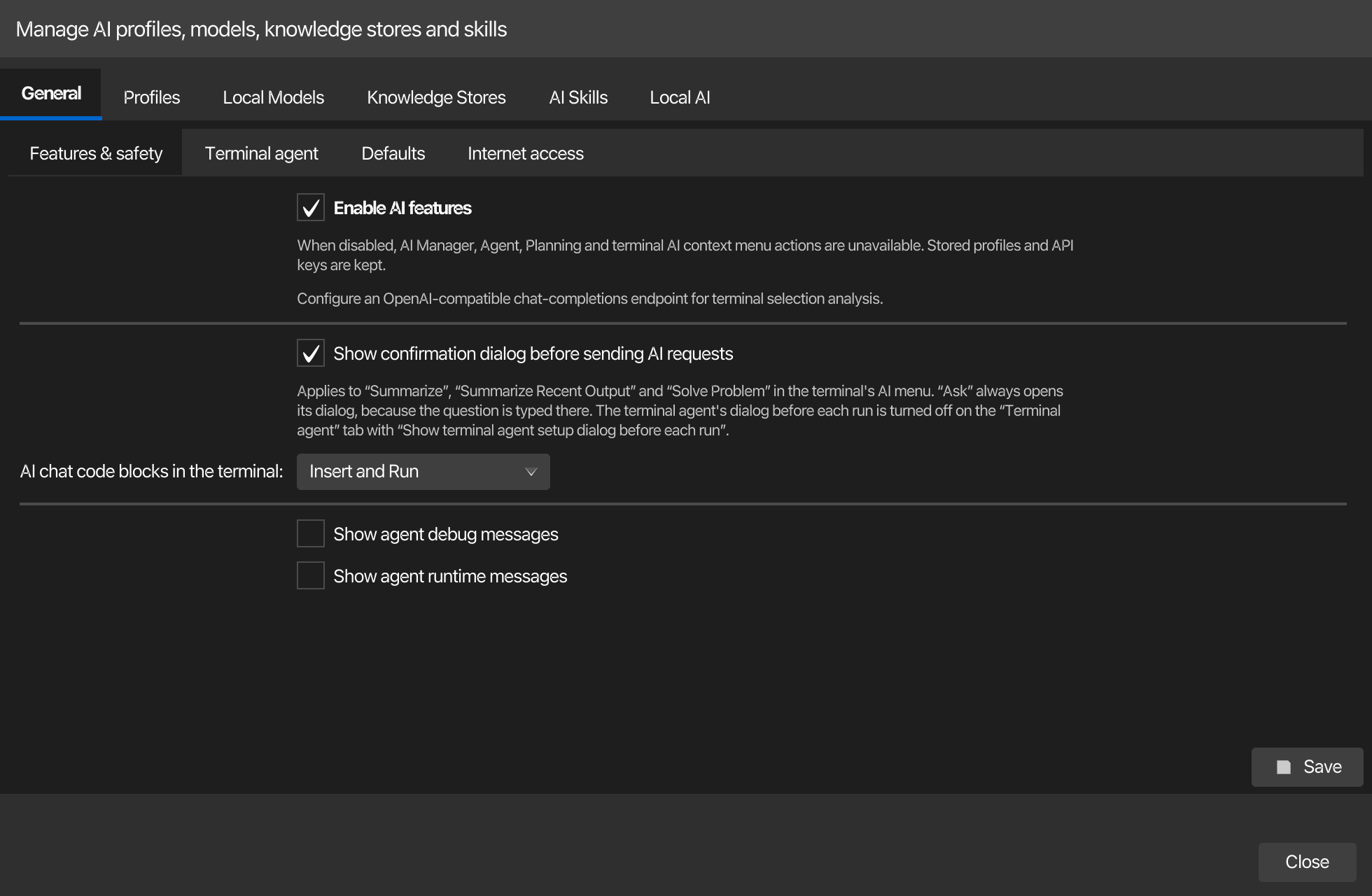
Every AI setting lives in one place: AI → AI Manager. Its first tab, General, holds the options that are not part of a profile (feature switches, the terminal agent, defaults for snippet actions, internet tools) on four section tabs; Profiles holds the AI profiles with their model, connection, limits and budget; Local Models, Knowledge Stores, AI Skills and Local AI the rest. The values are stored in ~/.kortty/global-settings.xml. The Global Settings window has no AI tab any more.
Searching the AI Manager
A search line sits at the top of the AI Manager, above its tabs, like the search of the settings dialog. Type a word and the matching options are listed; choosing one opens its page, scrolls to the option and highlights it. Cmd+F (Ctrl+F on Windows and Linux) jumps to the line from the tabs and their pages.
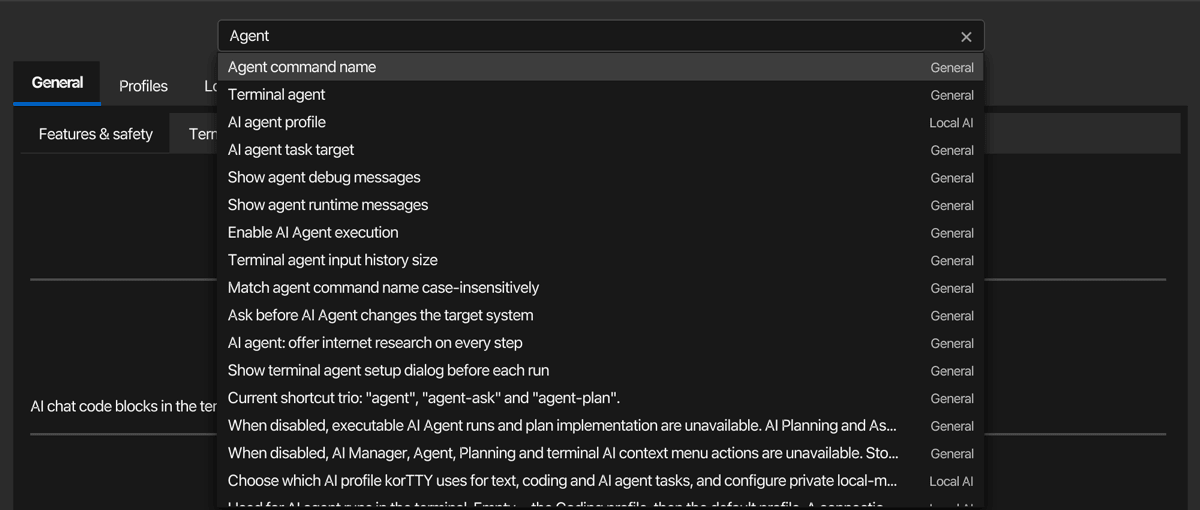
- General, Profiles and Local AI are searched by their own options, also before you open their tabs for the first time.
- Local Models, Knowledge Stores, AI Skills and Memory are found by their names and by keywords, for example GGUF or Hugging Face for Local Models, RAG or embeddings for Knowledge Stores, GitHub or import for AI Skills, and remember or MEMORY.md for Memory.
- Inside the editors of the AI Skills and Memory pages, Cmd+F and Ctrl+F keep their own find in the editor; the search line is then reached with the mouse.
General tab
AI → AI Manager → General groups the global options on four section tabs. Save under the sections writes all of them; closing the AI Manager saves them as well.
| Section | Settings |
|---|---|
| Features & safety | Enable AI features, confirmation before sending, AI chat code blocks in the terminal, agent debug and runtime messages |
| Terminal agent | Agent execution, confirmation before changes, setup dialog before each run, estimate complexity, command name and case matching, task target, input history size |
| Defaults | Security-check profile, default language for AI text in code, optional instructions in the snippet editor, number of alternative solutions |
| Internet access | Tavily, Bright Data and Brave Search secrets, SearXNG URL, MCP server labels and plugin ids, "offer internet research on every step" |
The tables below list every setting of these sections with its stored key.
Core Settings
| Setting | Type | Values | Default | Stored as |
|---|---|---|---|---|
| Enable AI features | toggle | — | On | aiFeaturesEnabled |
| Show confirmation dialog before sending AI requests | toggle | — | On | aiConfirmBeforeSend |
| AI chat code blocks in the terminal | dropdown | Off (copy and save only), Insert only, Insert and Run | Insert and Run | aiChatTerminalActions |
With Show confirmation dialog before sending AI requests on, Summarize, Summarize Recent Output and Solve Problem in the terminal's AI context menu show what they send to the AI and wait for a confirmation. Ask always opens its dialog, because the question is typed there. The terminal agent has a dialog of its own before each run; it is turned off with Show terminal agent setup dialog before each run under Terminal AI Agent.
AI chat code blocks in the terminal decides which buttons the code blocks of an AI chat offer: Insert types a block at the prompt of a terminal pane without pressing Enter, and Run runs a single shell command line after a confirmation. The enterprise policy can only take more away. See Code blocks in the terminal.
Terminal AI Agent
| Setting | Type | Values | Default | Stored as |
|---|---|---|---|---|
| Enable AI Agent execution | toggle | — | On | terminalAgentExecutionEnabled |
| Ask before AI Agent changes the target system | toggle | — | Off | terminalAgentConfirmMutatingCommandSets |
| Show agent debug messages | toggle | — | Off | terminalAgentShowDebugMessages |
| Show agent runtime messages | toggle | — | Off | terminalAgentShowRuntimeMessages |
| Show terminal agent setup dialog before each run | toggle | — | On | terminalAgentShowRunDialog |
| Estimate complexity | dropdown | Automatic, Always, Never | Automatic | aiAgentTriageMode |
| Agent command name | text | — | agent | terminalAgentCommandName |
| Match agent command name case-insensitively | toggle | — | Off | terminalAgentCommandNameCaseInsensitive |
| AI agent task target | dropdown | Terminal window, New chat window | Terminal window | terminalAgentExecutionTarget |
| Terminal agent input history size | number | 5–100 | 20 | terminalAgentInputHistorySize |
Estimate complexity decides when the agent offers solution options before it runs. Automatic makes one small AI call before each run and offers options only for requests that look complex, Always offers them for every run, and Never runs requests as they are. Swarm runs and scheduled jobs never offer options. The enterprise policy can lock the setting with triage under [rule.ai-memory]. See Solution options.
Memory tab
The Memory tab of the AI Manager holds the korTTY memory, the rules that AI chat and agent requests carry along. Its files, scopes, cleanup and protection of your own text are described in AI memory.
| Setting | Type | Values | Default | Stored as |
|---|---|---|---|---|
| Use memory | toggle | — | On | aiMemoryEnabled |
| Learning | dropdown | Suggest rules, Off | Suggest rules | aiMemoryLearningMode |
| Token budget | number | 500–4000 | 1500 | aiMemoryMaxTokens |
The token budget is the most memory one AI request carries; entries that do not fit are left out of that request, and an enterprise policy can lower the budget. In Suggest rules mode korTTY looks at your messages for something to keep for later and proposes it as a rule; nothing is saved without your confirmation. Off finds no rules.
AI Profiles
| Setting | Type | Values | Default | Stored as |
|---|---|---|---|---|
| Default profile | check box "Use as default profile" in the Profiles tab | one profile is always the default | the first profile | defaultAiProfileId |
| AI request timeout | number | 0–1440 minutes | 0 (no timeout) | aiRequestTimeoutMinutes |
| Security-check profile | dropdown | (list of configured profiles; empty = use default profile) | — | securityCheckAiProfileId |
| Other computers on the network (setup wizard quick start) | text | host, host:port or http:// URL, comma-separated; probed besides localhost |
— | aiWizardScanHosts |
The security-check profile is a dedicated AI profile for snippet Security Check actions. Leave it empty (or use Clear) to reuse the default profile. It can also be set directly in the snippet Security Check window, and both places share the same remembered setting.
AI request timeout is the maximum runtime of a single AI request and applies to every profile. The default 0 means korTTY imposes no timeout at all: long-running tasks such as the snippet editor's Full code analysis run until the model answers. Set a positive number of minutes to cancel requests that exceed it. A profile can override the value — see Timeout for this profile below. In the AI Manager the global value is the first row of the profile editor's Limits & timeouts section.
In the AI Manager the default profile is chosen with the Use as default profile check box next to the profile name; one profile is always the default, so ticking the box on another profile moves it.
Profile Settings (in Editor Sections)
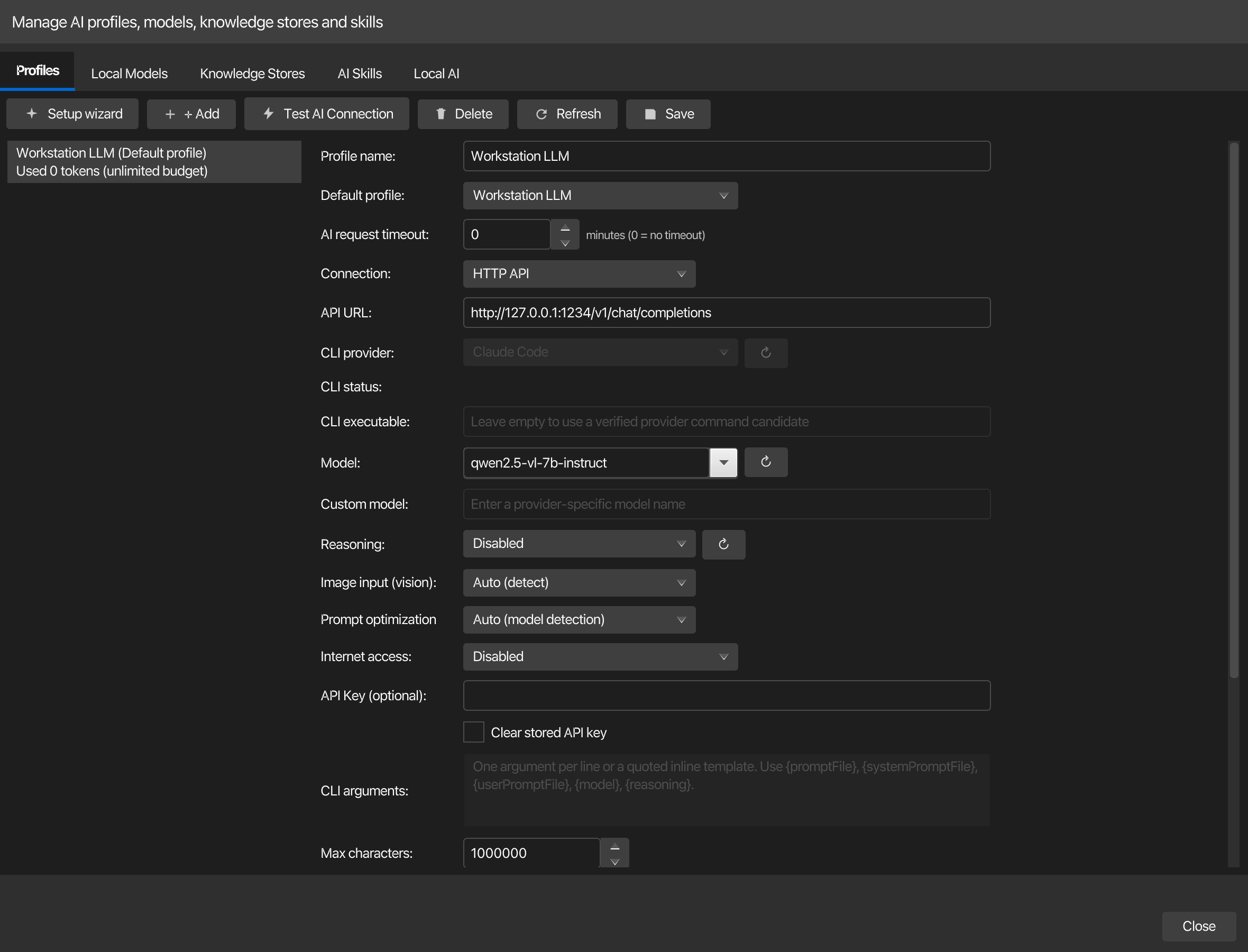
The profile fields are edited in AI > AI Manager > Profiles. The editor keeps Profile name and Use as default profile above four section tabs, and the Connection and Model & capabilities sections show only the rows that apply to the selected Connection mode (the URL and key rows for HTTP API, the CLI rows for Local CLI, a note for Integrated llama.cpp and Integrated MLX):
| Section | Fields |
|---|---|
| Connection | Connection, API URL, Trusted local endpoint, API Key (with Clear stored API key beside it), CLI provider, CLI status, CLI executable, CLI arguments |
| Model & capabilities | Model, Custom model, Context window (Integrated llama.cpp only), Reasoning, Image input (vision), Prompt optimization, Internet access |
| Limits & timeouts | AI request timeout (applies to every profile, shown first), Max characters, Timeout for this profile, Max output tokens |
| Budget & usage | Tokenizer, Max tokens, Warning thresholds, Reset, Price per 1M tokens, Usage (the quota bar and the usage line) |
| Setting | Type | Values | Default | Stored as |
|---|---|---|---|---|
| Profile name | text | — | AI Profile | (profile name field) |
| Connection | dropdown | HTTP API, Local CLI, Integrated llama.cpp, Integrated MLX (Apple Silicon; offered on Apple Silicon Macs only) | HTTP API | (profile connectionMode field) |
| API URL | text | — | — | (profile apiUrl field) |
| Trusted local endpoint: send terminal selections without masking secrets | check box | Available only for an HTTP API profile whose API URL is on localhost or 127.0.0.1. On: terminal selections and attached files reach this endpoint without masking — turn it on only when the endpoint runs the model itself, not for a proxy or an SSH port forward to a cloud API. See Masking secrets before sending |
Off | (profile trustedLocalEndpoint field) |
| CLI provider | dropdown | (registered providers) | — | (profile cliProviderId field) |
| CLI executable | text | — | — | (profile cliExecutablePath field) |
| Model | dropdown/text | (editable; "Default", curated cloud-provider suggestions plus live-loaded models; "Auto" only for local LM Studio endpoints) | — | (profile model field) |
| Local GGUF model | dropdown | Installed chat models; available when Connection is Integrated llama.cpp | — | (profile embeddedModelId field) |
| Context window | number + slider | 512 tokens up to the context the selected GGUF model was trained for (read from the file); available when Connection is Integrated llama.cpp. Pre-set to 32,768 tokens (or the trained context when that is less) whenever the profile or the model is selected; a file that does not declare its trained context gets a range up to 131,072 tokens. The value belongs to the model, so it applies to every profile that uses it and is the same as Context size under Local Models > Configure; a larger context needs more RAM or VRAM. Saving stops a loaded model so its next request starts it with the new size; a model that is answering a request keeps its size and korTTY says so | 32,768 | (model contextSize in llm/models.xml) |
| Local MLX model | dropdown | Installed MLX models; available when Connection is Integrated MLX (Apple Silicon) | — | (profile embeddedModelId field) |
| Custom model | text | — | — | (profile model field, written when the Model dropdown is set to Custom model for a Local CLI profile) |
| Prompt optimization | dropdown | Auto (model detection), Generic, Llama, Qwen, Mistral, Gemma, DeepSeek, Phi, GPT-OSS | Auto | (profile promptPreset field) |
| Reasoning | dropdown | Model default, None, Minimal, Low, Medium, High, Extra high | Model default | (profile reasoningEffort field) |
| Image input (vision) | dropdown | Auto (detect), Enabled, Disabled | Auto (detect) | (profile visionSupport field) |
| Internet access | dropdown | Disabled, KorTTY Tavily Tool, LM Studio Tavily MCP, Bright Data Web MCP, Brave Search MCP, SearXNG MCP, LM Studio Toolpack (locked to Disabled, with a hint, for a native Anthropic Messages API URL) | Disabled | (profile internetAccessMode field) |
| API Key (optional) | text | (password field) | — | (profile encryptedApiKey field) |
| Max characters | number | 1–50,000,000 | 100,000 | (profile maxSelectionChars field) |
| Timeout for this profile | check box + number | Own timeout off = follow the global timeout; on: 0–1440 minutes (0 = never time out) | Off | (profile requestTimeoutMinutes field) |
| Max output tokens | check box + number | Own limit off = automatic per model and action; on: 256–1,048,576 tokens per answer | Off | (profile maxOutputTokens field) |
| Tokenizer | dropdown | Estimate, OpenAI cl100k_base, OpenAI o200k_base, OpenAI p50k_base, OpenAI r50k_base | Estimate | (profile tokenizerType field) |
| Max tokens | number + unit | (amount: 0–1,000,000; unit: Thousands or Millions) | 0 (unlimited) | (profile tokenLimitAmount, tokenLimitUnit fields) |
| Warning thresholds | number pair | Yellow %: 0–100, Red %: 0–100 | 75%, 90% | (profile tokenWarningYellowPercent, tokenWarningRedPercent fields) |
| Reset | number + anchor date | Period: 1–3650 days; Anchor date | 30 days | (profile tokenResetPeriodDays, tokenResetAnchorDate fields) |
| Price per 1M tokens | two numbers + currency | Input and Output price per one million tokens (comma or dot as decimal separator; empty = no price); currency EUR, USD, CHF, GBP or any ISO code. Edited in AI → AI Manager → Profiles | empty, EUR | (profile pricePerMillionPromptTokens, pricePerMillionCompletionTokens, priceCurrency fields) |
| Test AI Connection | button | — | — | (action only) |
Snippet Editor
| Setting | Type | Values | Default | Stored as |
|---|---|---|---|---|
| Default language for AI text in code | dropdown | (available language options) | — | aiCodeTextDefaultLanguage |
| Show optional additional instructions for AI actions in the snippet editor | toggle | — | Off | aiSnippetEditorAdditionalInstructionsEnabled |
| Maximum alternative solutions | number | 1–10 | 3 | aiSnippetAlternativeSolutionCount |
Internet Access Configuration
| Setting | Type | Values | Default | Stored as |
|---|---|---|---|---|
| Tavily API key | text | (password field) | — | encryptedAiTavilyApiKey |
| Bright Data API token | text | (password field) | — | encryptedAiBrightDataApiToken |
| Brave Search API key | text | (password field) | — | encryptedAiBraveSearchApiKey |
| SearXNG URL | text | — | — | aiSearxngUrl |
| Tavily MCP server label | text | — | tavily | aiTavilyMcpServerLabel |
| Bright Data MCP server label | text | — | bright-data | aiBrightDataMcpServerLabel |
| Brave Search MCP plugin ID | text | — | — | aiBraveSearchMcpPluginId |
| SearXNG MCP plugin ID | text | — | — | aiSearxngMcpPluginId |
| LM Studio Toolpack MCP plugin ID | text | — | — | aiLmStudioToolpackMcpPluginId |
| AI agent: offer internet research on every step | toggle | — | Off | aiAgentAlwaysOfferWebTools |
AI agent: offer internet research on every step only affects the KorTTY Tavily Tool mode. When off, a Terminal AI Agent step gets the web tools only if its task contains a web signal word or a URL; when on, every step gets them and the model decides whether to search or read a page.
Notes
AI Profiles
KorTTY stores multiple named AI profiles, each with its own model, connection method, reasoning settings, prompt preset, and optional knowledge stores. Each profile tracks its own token usage separately. Profiles support three connection modes:
- HTTP API: Direct connection to an OpenAI-compatible REST endpoint (specify API URL, model name, and optional API key).
- Local CLI: Execute a local command-line AI client (configure CLI provider, custom executable, arguments template, and custom model name).
- Integrated llama.cpp: Choose the installed chat GGUF in Local GGUF model. korTTY acquires a private loopback
llama-serverlease for it; the API URL and profile API key are managed by korTTY and are not editable.
An explicitly chosen or security-check profile remains most specific. Otherwise terminal text actions use the configured Text profile, code actions use the Coding profile, and an unassigned role falls back to the Default profile. Configure those roles and the local runtime under AI > AI Manager > Local AI; see Local models with llama.cpp. Terminal agent runs follow their own order, which includes the AI agent profile; see Local AI manager settings.
The AI Manager is modeless and can remain open while you use the main window. Invoking it again restores and focuses the same manager for that main window, and its open primary section remains visibly marked with a bold accent underline when you interact with controls inside that section.
Local AI manager settings
AI > AI Manager > Local AI groups these settings on three section tabs: Profile roles (the four profile selectors), Local runtime (runtime updates, preferred backend, RAG embedding model ID) and Hugging Face (the token). Save under the sections writes all of them.
| Setting | Values | Default | Stored as |
|---|---|---|---|
| Text and translation profile | Configured AI profile, or use default | Use default | textAiProfileId |
| Coding profile | Configured AI profile, or use default | Use default | codingAiProfileId |
| AI agent profile | Configured AI profile, or empty (the Coding profile, then the default) | Empty | terminalAgentAiProfileId |
| Session journal profile | Configured AI profile, or use default | Use default | sessionJournalAiProfileId |
| RAG embedding model ID | Installed local embedding model | — | ragEmbeddingModelId |
| llama.cpp runtime updates | Off, Notify me, Install stable updates automatically | Notify me | llamaRuntimeUpdatePolicy |
| Preferred runtime backend | Auto/CPU/Metal on macOS; Auto/CPU/Vulkan on Windows/Linux | Auto | preferredLlamaRuntimeBackend |
| Hugging Face token | Optional encrypted token for gated/private repositories | — | encryptedHuggingFaceToken |
The AI agent profile is the role of the terminal AI agent. The profile of a run is chosen in this order: first the profile picked in the run's setup or plan dialog, or named in the agent command; then the connection's own AI profile; then the AI agent profile; then the Coding profile; and finally the default profile. A profile that no longer exists is skipped and the next level applies. An empty AI agent profile keeps the previous behaviour, the Coding profile and then the default profile. Ask runs use the same order.
Automatic (keep active backend) retains the active runtime package backend for updates. With no installed package, Auto initially selects Metal on macOS and CPU elsewhere. Starting a model configured for another supported GPU backend offers to install the matching signed package.
The Local Models > Setup assistant exposes optional Text, Coding, and RAG-embedding slots. It verifies every selected fixed revision, quantization, license, and exact size before starting its asynchronous runtime/model installation, runs a real chat or embedding test for each installed GGUF, and saves the resulting role assignments only after all tests succeed. The Text and Coding slots may share one model. Configure refuses to replace a model's persisted runtime settings while that model is serving an active request.
Knowledge stores assigned to the Text/Coding roles add only bounded, cited excerpts to matching normal terminal and snippet AI requests, never the complete knowledge store. A cloud Text/Coding profile receives those excerpts over its configured provider connection, so assigning the knowledge store to that role/profile is explicit permission for that disclosure. Agent, Planning, Swarm, and scheduled autonomous prompts remain a separate opt-in; see RAG knowledge stores.
Prompt optimization presets
Auto (model detection) resolves common Llama, Qwen, Mistral/Mixtral, Gemma, DeepSeek, Phi, and GPT-OSS names. A family preset adds concise compatibility guidance while leaving korTTY's strict JSON/code contracts authoritative; Generic adds no family-specific guidance. llama.cpp still applies the GGUF's native chat template.
Reasoning Effort Levels
Reasoning effort configures how deeply the AI thinks before responding. Available levels depend on the model and endpoint:
- Model default: No reasoning parameter is sent, so the model's own default applies. A model that reasons by default, such as Qwen in LM Studio, keeps thinking.
- None: Explicitly switches reasoning off with the transport's supported off value. Choose this, not Model default, to stop a reasoning model from thinking.
- Minimal: Light reasoning; fastest execution.
- Low: Low effort reasoning; balance between speed and depth.
- Medium: Medium effort; reasonable depth.
- High: High effort; more thorough reasoning.
- Extra high: Maximum reasoning effort; slowest but most comprehensive.
Not all models support all levels. When LM Studio publishes capabilities.reasoning.allowed_options through its native model metadata, korTTY uses that exact list instead of treating a silently converted value as supported, and it reads that list automatically: picking another model or endpoint in the profile editor re-reads the metadata for the model you just chose, so the dropdown follows the profile without any further action. The list is only read from the endpoint's model metadata here — a single request that sends no prompt. Use the Refresh reasoning options button when you want to force a re-check, or for an endpoint that publishes no such metadata: that button also runs active connection probes. Those probes, like Test AI Connection, count a reply that arrives only as reasoning as a working connection, because a model that thinks by default can spend the test's short reply budget on reasoning before it writes an answer.
For a binary off/on model, an explicit none request switches this feature off, while omitting the reasoning parameter uses the model's published default; the unsupported Minimal, Low, Medium, High, and Extra high levels are not offered. A model whose LM Studio metadata publishes no reasoning capability at all — including a virtual model that overrides its reasoning metadata to false — offers only Model default: LM Studio skips an unsupported request-time reasoning value with a log warning instead of rejecting the request, so an active probe would mistake every level for supported.
A detected list belongs to the endpoint and model it was read for. Changing either discards it, and where korTTY cannot read the new combination's metadata — a CLI profile, a cloud endpoint — the profile falls back to the conservative defaults for its model name until you press Refresh reasoning options. A level that is no longer offered is dropped from the request with a log line naming the level actually used. Fields that a profile's own connection mode does not use, such as the CLI provider of an HTTP profile, never invalidate a detected list. Profiles using an integrated model keep their detected levels.
For MiniMax endpoints (directly or through an aggregator whose model name contains minimax), both Model default and an explicit none are sent as MiniMax's own thinking: disabled parameter, because those models ignore reasoning_effort and otherwise think by default — billing the hidden reasoning as completion tokens and, for MiniMax-M3, opening the reply with an inline <think> block. An explicit effort level is passed through unchanged.
For MiniMax, use the OpenAI-compatible URL https://api.minimax.io/v1/chat/completions rather than the native /text/chatcompletion_v2 endpoint: the native one answers a wrong key, model or an empty balance with HTTP 200 and an error object, which korTTY now shows as the provider's own message but which the OpenAI-compatible endpoint reports with a proper HTTP status.
For the native Anthropic (Claude) endpoint, an enabled reasoning level requests extended thinking with a level-dependent thinking budget; models that do not support extended thinking are retried once without it. The budget always stays below the request's output limit — see Output limit per answer. The model's reasoning is shown in the Terminal AI Agent's 💭 thinking rows.
Output limit per answer
Max output tokens caps how many tokens one answer may use, thinking included. With Own limit off, korTTY picks the limit automatically. The value can only lower a limit, never raise one: actions that carry their own safety limit — a Mermaid diagram (32,768 tokens), a full-replacement snippet edit, code completion (4,096 tokens) or ASCII art — keep that limit even when the profile allows more.
On the native Anthropic (Claude) endpoint the limit of each request is the smallest of the action's safety limit, the profile's Max output tokens, the model's documented output limit and 16,000 tokens. korTTY knows the output limits of the current Claude families (Opus 5, Sonnet 5, Fable 5 and Mythos 5, Opus 4.6–4.8 and Sonnet 4.6 at 128,000 tokens; Opus 4.5, Sonnet 4.5 and Haiku 4.5 at 64,000 tokens); any other model gets 4,096 tokens unless the profile sets its own limit. The 16,000-token ceiling applies because korTTY does not stream Anthropic answers yet, and Anthropic advises streaming for larger outputs so that a long, silent request is not cut off. A thinking budget is always fitted strictly below the limit — shrunk when it would leave too little room for the answer, and dropped when it would fall below Anthropic's minimum of 1,024 tokens. If the API rejects a request because max_tokens is too high for the model, korTTY retries it once with the limit named in the error. When a request timeout is set, korTTY raises it for a large limit so that the answer has time to arrive (about 7.5 minutes for 16,000 tokens); without a timeout nothing changes.
On OpenAI-compatible endpoints the profile value is sent as max_tokens for every request that has no action limit of its own.
Image input (vision)
Image input (vision) decides whether korTTY may attach images to a prompt for this profile — used by the session journal's AI screenshot analysis. Auto (detect) derives the capability from the endpoint: for a local LM Studio endpoint the model metadata is authoritative (a vlm model counts as image-capable; the answer is read together with the reasoning levels — by the automatic metadata read and by Refresh reasoning options — and cached with them), the native Anthropic endpoint always counts as image-capable, and other endpoints are recognized by well-known vision model names (GPT-4o/4.⅕, o3/o4, Gemini, Gemma 3, Qwen-VL, LLaVA, Pixtral and similar). Enabled/Disabled override the detection for models it misjudges. CLI and integrated (llama.cpp/MLX) profiles cannot send images. Local LM Studio vision models (vlm) also appear in the model dropdown.
Token Quota Management
Each AI profile maintains a token usage quota with the following controls:
- Tokenizer: Choose which tokenizer estimates token counts—useful when switching between OpenAI and other providers. Options are Estimate (generic), cl100k_base (GPT-3.5/4), o200k_base (o1/o1-mini), p50k_base (Codex), and r50k_base (GPT-2).
- Max tokens limit: Set a spending cap (in thousands or millions of tokens, or unlimited). Token count resets on a rolling schedule.
- Reset period: Number of days between resets (1–3650), with an optional anchor date for predictable reset timing.
-
Warning thresholds: Yellow warning triggers at a percentage of the limit; red warning at a higher percentage. Configure both as integers 0–100.
-
Price per 1M tokens (AI Manager only, optional): the price the provider charges per one million input and output tokens. With a price, korTTY shows what AI calls cost in money — next to the quota bar as "≈ 3.42 € in this period", on session journals and in the AI Swarm dashboard header. A profile running locally (an integrated llama.cpp/MLX model or an endpoint on
localhost/127.0.0.1) is shown as "local · no token costs" instead.
Token usage is displayed as a colored bar and summary on the profile editor, and the profile list shows token status inline. Usage is counted for every AI call made with the profile: chat answers, the terminal AI agent, every agent of an AI Swarm run plus its final combined answer, scheduled AI jobs, and every session journal call (summaries, titles, screenshot analysis, questions, translations).
Internet Access Modes
Per-profile internet access strategy for AI requests. Each mode requires different credentials and MCP configuration:
- Disabled (default): No internet access.
- KorTTY Tavily Tool: Built-in web search using Tavily API directly (requires Tavily API key).
- LM Studio Tavily MCP: Web search via an LM Studio Tavily MCP instance (requires Tavily API key and MCP server label).
- Bright Data Web MCP: Structured data extraction and browsing via Bright Data Web MCP (requires Bright Data API token and MCP server label).
- Brave Search MCP: Search via Brave Search MCP (requires Brave Search API key and MCP plugin ID in
mcp/<server_label>format). - SearXNG MCP: Search via a SearXNG MCP instance (requires SearXNG URL and MCP plugin ID in
mcp/<server_label>format). - LM Studio Toolpack: Community LM Studio Toolpack web-search server (requires plugin ID in
mcp/<server_label>format).
Credentials are encrypted and stored securely. Use the Clear toggle adjacent to each secret field to erase stored values on the next save.
Embedded profiles support only the KorTTY Tavily Tool
A profile whose connection mode is Integrated llama.cpp or Integrated MLX can use KorTTY Tavily Tool and nothing else. The five MCP modes route the request through LM Studio's native API, which an embedded model never goes through — selecting one on an embedded profile fails the request with an explicit message instead of silently answering without web access. Local CLI profiles have no internet modes at all; the dropdown is disabled for them.
Native Anthropic Messages API profiles (an API URL ending in /v1/messages) have no internet modes either, because korTTY sends no web tools to that API: the dropdown is locked to Disabled, and a hint below it says why. A mode stored by an earlier version is shown as Disabled when the profile is opened and has no effect on requests.
An organization can forbid web access entirely with the allow-internet policy key — see
Enterprise policy.