Colors
Configure terminal display colors including text, background, cursor, selection, and the 16-color ANSI palette. Open via Configuration → Global Settings → Colors; stored in ~/.kortty/global-settings.xml.
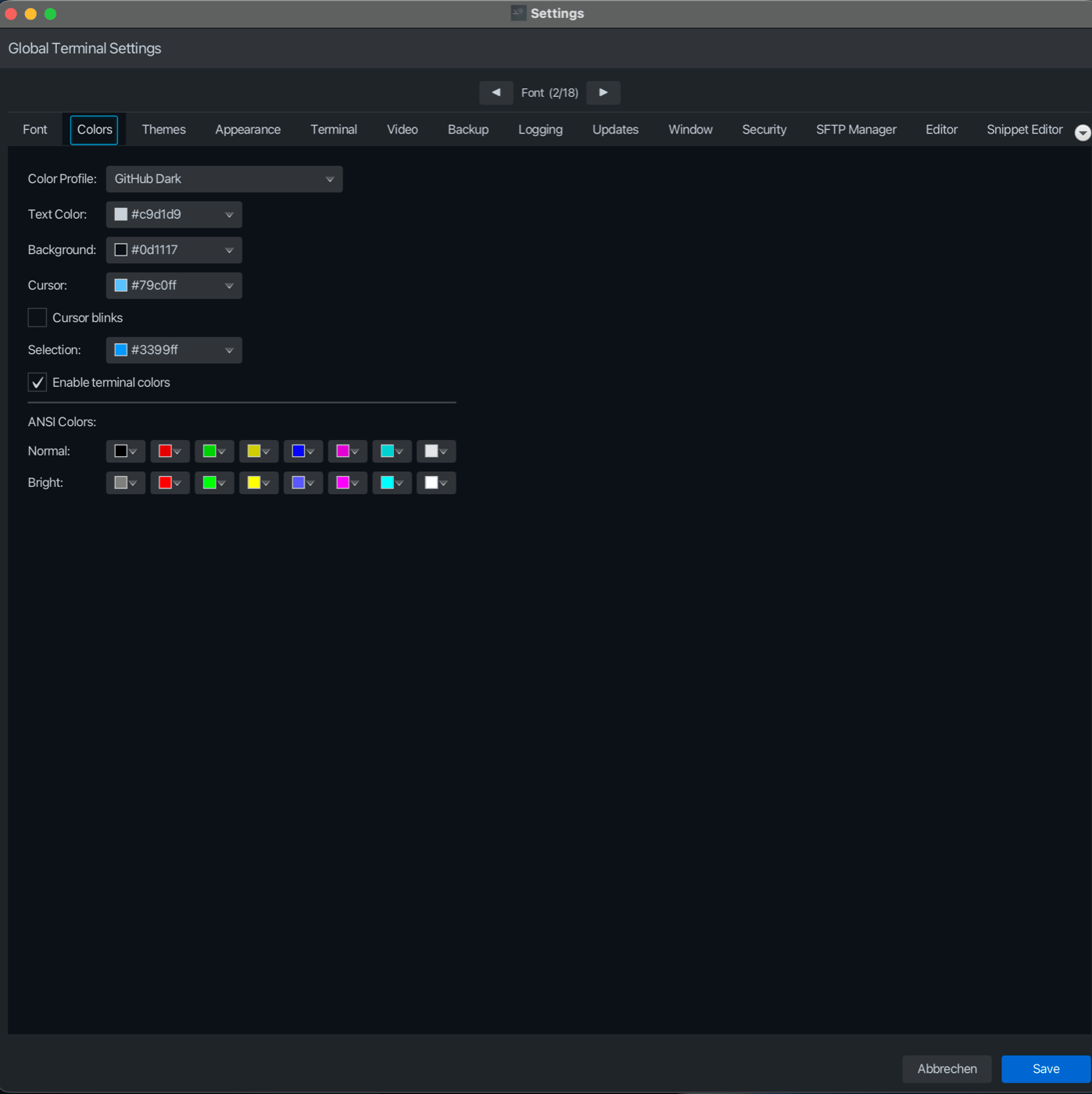
| Setting | Type | Values | Default | Stored as |
|---|---|---|---|---|
| Color Profile | dropdown | Theme names (e.g., GitHub Dark, Dracula, etc.) | GitHub Dark | themeId |
| Text Color | color | RGB hex color | #FFFFFF | foregroundColor |
| Background | color | RGB hex color | #1E1E1E | backgroundColor |
| Cursor | color | RGB hex color | #FFFFFF | cursorColor |
| Cursor blinks | toggle | — | On | terminalCursorBlink (mirrored into cursorStyle) |
| Selection | color | RGB hex color | #3399FF (inverse video until customized) | selectionColor |
| Enable terminal colors | toggle | — | On | terminalColorsEnabled |
| Normal: Black | color | RGB hex color | built-in palette | ansiBlack |
| Normal: Red | color | RGB hex color | built-in palette | ansiRed |
| Normal: Green | color | RGB hex color | built-in palette | ansiGreen |
| Normal: Yellow | color | RGB hex color | built-in palette | ansiYellow |
| Normal: Blue | color | RGB hex color | built-in palette | ansiBlue |
| Normal: Magenta | color | RGB hex color | built-in palette | ansiMagenta |
| Normal: Cyan | color | RGB hex color | built-in palette | ansiCyan |
| Normal: White | color | RGB hex color | built-in palette | ansiWhite |
| Bright: Black | color | RGB hex color | built-in palette | ansiBrightBlack |
| Bright: Red | color | RGB hex color | built-in palette | ansiBrightRed |
| Bright: Green | color | RGB hex color | built-in palette | ansiBrightGreen |
| Bright: Yellow | color | RGB hex color | built-in palette | ansiBrightYellow |
| Bright: Blue | color | RGB hex color | built-in palette | ansiBrightBlue |
| Bright: Magenta | color | RGB hex color | built-in palette | ansiBrightMagenta |
| Bright: Cyan | color | RGB hex color | built-in palette | ansiBrightCyan |
| Bright: White | color | RGB hex color | built-in palette | ansiBrightWhite |
Notes
Color Profiles
Color Profile allows you to select a preset theme that applies foreground, background, cursor, and cursor shape settings at once. Switching profiles will update the individual color controls. If Apply Profile is available, it will reset colors to the selected theme's defaults.
Cursor blinks
Cursor blinks is your own preference and is kept when you switch color profiles: a profile contributes the cursor shape (block, underline, vertical bar), while the blinking on/off state stays as you set it. The terminal reads the flag as part of cursorStyle (for example STEADY_BLOCK when blinking is off), but your choice is stored separately as terminalCursorBlink and wins over whatever style a profile, a theme or a per-connection setting carries — so switching profiles cannot turn blinking back on, and the setting survives restarts. A settings file written before that field existed keeps working: the choice is then read out of the stored cursorStyle.
ANSI Colors
The Normal and Bright color palettes define the 16 ANSI colors (0–7 normal, 8–15 bright) used when Enable terminal colors is on. Each set of 8 colors corresponds to black, red, green, yellow, blue, magenta, cyan, and white. When terminal colors are disabled, only the configured Text Color and Background are used, ignoring all ANSI and TrueColor sequences.
As long as you leave the palette and the Selection color untouched, the terminal keeps its built-in palette — the xterm colors, or the Windows console colors on Windows — and the pickers show exactly those colors. Change any of the 16 colors or the selection color and click Save: all 16 colors and the selection color then apply to every open terminal right away, without reconnecting, and korTTY remembers that you customized them (ansiPaletteCustomized). Setting every color back to its built-in value and the selection color back to #3399FF returns to the built-in look. Terminal recordings with Capture terminal colors in recordings use the same colors as the screen, and bold text follows Bold text on the screen and in recordings alike. Color profiles do not change the ANSI palette.
Selection
While the palette and the selection color are untouched, selected text is drawn in inverse video. Once you have customized them, the selection is drawn in the Selection color with black or white text, whichever is easier to read on it.