Messaging
Open Configuration → Global Settings → Messaging to choose which events send desktop notifications. Changes apply to open sessions when you save. The existing choices are stored in ~/.kortty/global-settings.xml and are retained when upgrading.
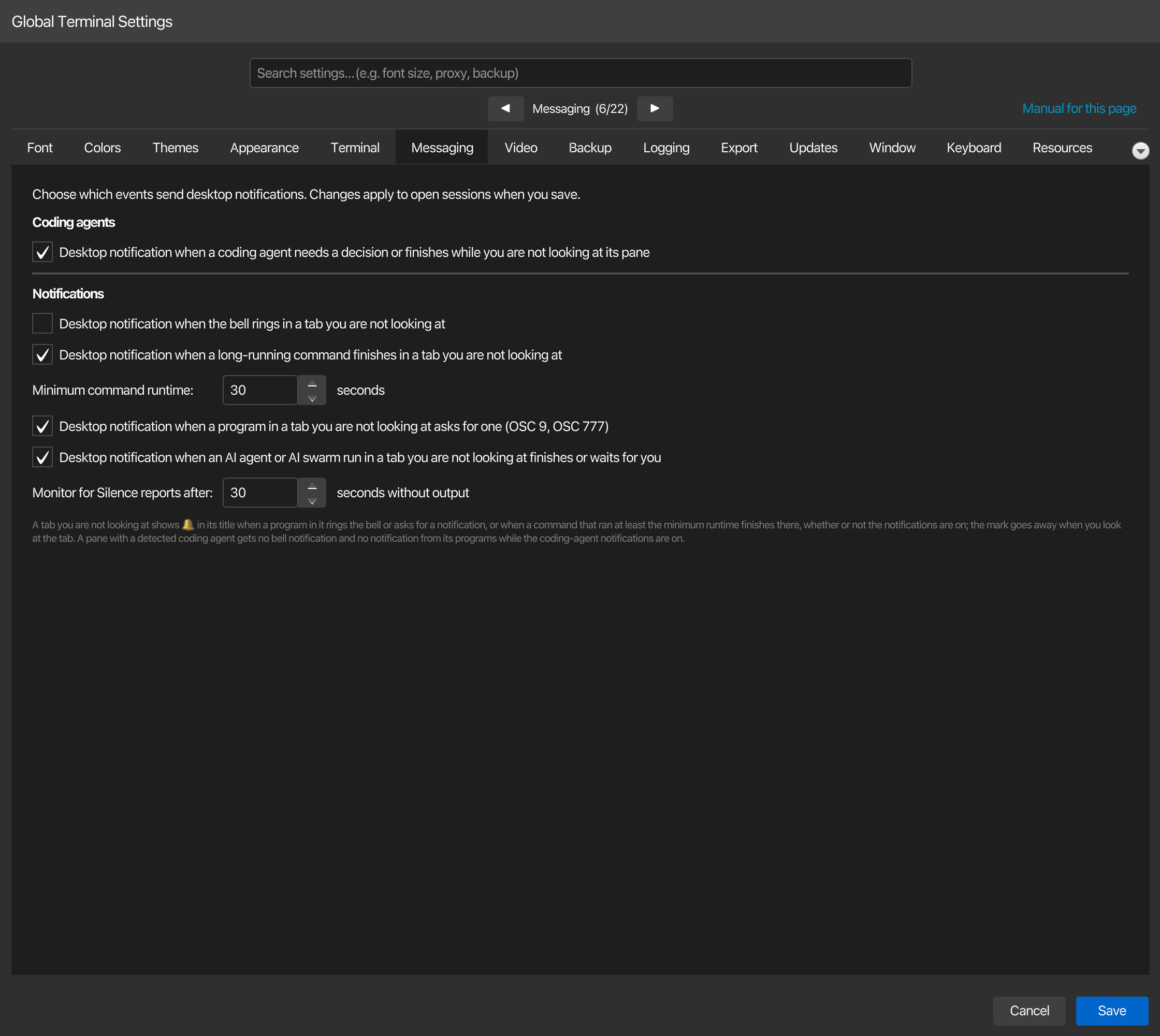
| Setting | Type | Values | Default | Stored as |
|---|---|---|---|---|
| Desktop notification when a coding agent needs a decision or finishes while you are not looking at its pane | toggle | — | On | codingAgentNotificationsEnabled |
| Desktop notification when the bell rings in a tab you are not looking at | toggle | — | Off | terminalBellNotificationsEnabled |
| Desktop notification when a long-running command finishes in a tab you are not looking at | toggle | — | On | commandFinishedNotificationsEnabled |
| Minimum command runtime: | number | 1–3,600 seconds | 30 | commandFinishedNotificationSeconds |
| Desktop notification when a program in a tab you are not looking at asks for one (OSC 9, OSC 777) | toggle | — | On | remoteTerminalNotificationsEnabled |
| Desktop notification when an AI agent or AI swarm run in a tab you are not looking at finishes or waits for you | toggle | — | On | aiRunToastsEnabled |
| Monitor for Silence reports after: | number | 5–3,600 seconds | 30 | terminalSilenceSeconds |
Coding-agent messages
Under Coding agents, turn off Desktop notification when a coding agent needs a decision or finishes while you are not looking at its pane and save to disable korTTY's detected-agent notifications. Detection, the sidebar and the app badge remain available; configure those under Terminal and see Coding agents.
Notifications requested directly by terminal programs (OSC 9 / OSC 777) and long-running-command notifications have their own switches on this page. An agent running on a remote server uses the program-notification channel because korTTY only detects agents in local shells. Turn off the corresponding switch too if you want to mute that channel.
Notes
- Long-running-command notifications and their minimum-runtime field are unavailable while shell integration is off under Terminal. Re-enabling shell integration makes the controls available again.
- Monitor for Silence reports after: sets the delay for tabs watched through their context menu. Activity and silence monitoring are enabled per tab, not by a global notification switch.
- An enterprise policy can disable desktop notifications and lock the notification switches. Tab attention marks remain visible inside korTTY.
- See Terminal notifications for event handling and notification clicks, and Coding agents for the detected-agent notification behavior.
Notifications
A program that rings the terminal bell in a tab you are not looking at always marks that tab with 🔔 until you look at it; this needs no setting. Desktop notification when the bell rings in a tab you are not looking at adds a desktop notification titled korTTY · and the tab's name, at most one per pane every 10 seconds. It is off by default because shells ring the bell on every failed Tab completion, and a pane with a detected coding agent gets none while the coding-agent notifications are on. The setting is read on every bell, so a change applies to open tabs as soon as you save.
In a shell set up for shell integration, a command that ran at least Minimum command runtime: (30 seconds by default) and finishes in a tab you are not looking at marks that tab with 🔔 too, and Desktop notification when a long-running command finishes in a tab you are not looking at, on by default, adds a desktop notification saying how the command ended and how long it ran, never the command itself, at most one per tab every 10 seconds. Commands of korTTY's AI Agent never notify. Both are greyed out while Use the command marks of shells set up for shell integration (OSC 133) is off, and both are read on every finished command. See Terminal notifications.
A program that asks for a desktop notification with OSC 9 or OSC 777, such as a coding agent on a server waiting for your answer, marks its tab with 🔔 too when you are not looking at it, and Desktop notification when a program in a tab you are not looking at asks for one (OSC 9, OSC 777), on by default, shows the program's text below a title with the tab's name, cleaned of control and bidi characters and cut to 80 characters for the title and 200 for the text, at most one per pane every 5 seconds; what comes in between is dropped. A pane with a detected coding agent gets none while the coding-agent notifications are on. It needs no shell integration and is read on every request. See Notifications from programs.
Desktop notification when an AI agent or AI swarm run in a tab you are not looking at finishes or waits for you, on by default, covers korTTY's own AI Agent and AI Swarm: when a run in a tab you are not looking at waits for your approval or a password, finishes or stops without finishing, a desktop notification titled with the tab's name says so in one fixed sentence, never with the prompt, a command or output, at most one per tab and kind every 10 seconds. A terminal tab is marked with 🔔 either way. It is read on every event. See AI agent and AI Swarm runs.
Monitor for Silence reports after: is how long a pane has to stay without output, after printing something, before a tab you watch with Monitor for Silence in its right-click menu is marked with 🔔 and shows a desktop notification, 30 seconds by default. The watch itself, like Monitor for Activity, which reports new output after 10 seconds of quiet, is switched per tab, off until you switch it on, and never saved. The threshold is read every second, so a change applies to the watched tabs as soon as you save. See Watching a tab for activity or silence.